
ACAI — Chapter 35: Database Schema Implementation
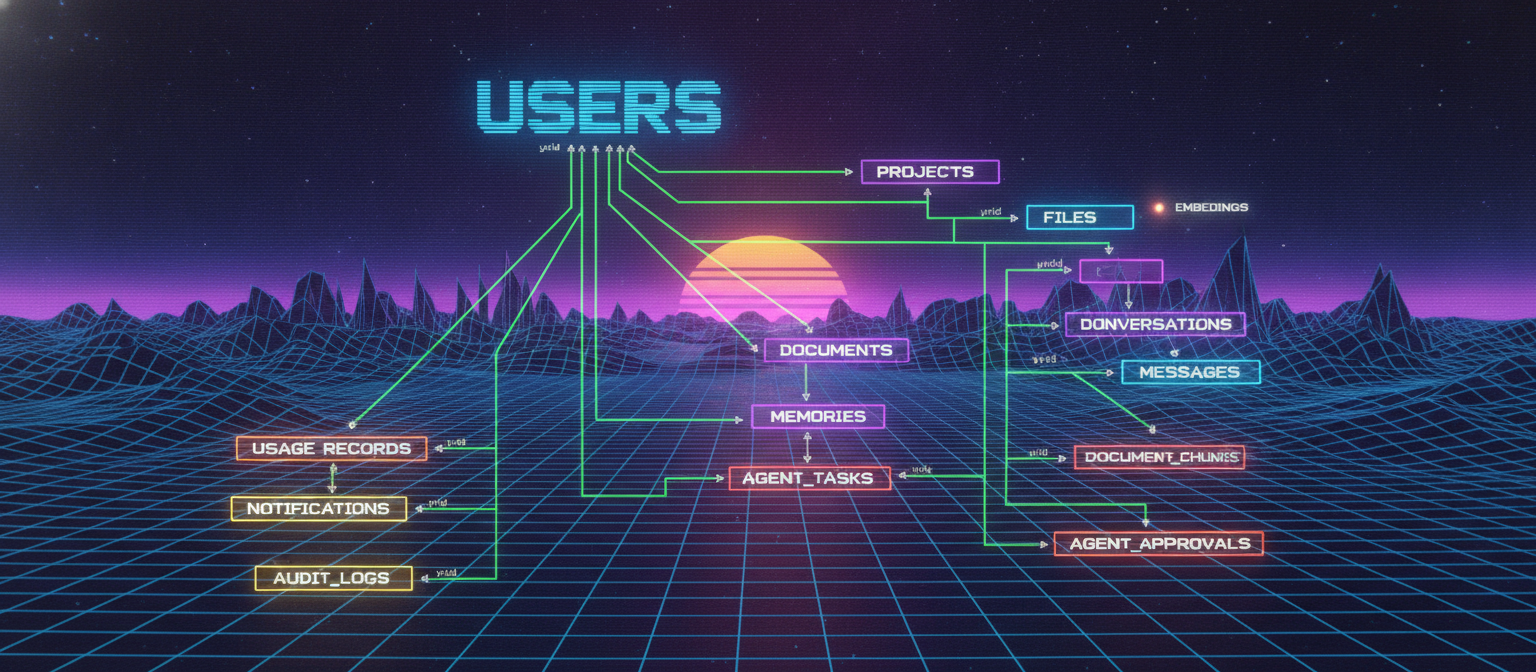
35.1 Chapter Objective
Chapter 34 defined the ACAI database architecture and data model.
This chapter converts that architecture into an implementation-ready schema design.
The objective is to define:
Tables
Primary Keys
Foreign Keys
Relationships
Indexes
Enums
Timestamps
Constraints
Soft Deletion
Migration Structure
The schema should remain modular so that the database can grow with the application.
35.2 Schema Design Principles
The ACAI database should follow these principles:
1. Every major entity has a stable ID.
2. Relationships are explicit.
3. Ownership is traceable.
4. User data is isolated.
5. Important timestamps are stored.
6. Frequently queried fields are indexed.
7. Destructive operations are deliberate.
8. Schema changes are version controlled.
35.3 Core Entity List
The first implementation should focus on the core entities:
users
projects
conversations
messages
files
documents
document_chunks
memories
agent_tasks
agent_steps
tool_calls
usage_records
audit_logs
Additional entities can be introduced later.
35.4 ID Strategy
Every major record should have a unique identifier.
Conceptually:
id
Example:
User ID
Project ID
Conversation ID
Message ID
File ID
Document ID
Agent Task ID
The exact ID technology can be selected according to the database stack.
Possible approaches include:
UUID
ULID
Database-generated identifiers
The important requirement is that IDs remain unique and stable.
35.5 Common Timestamp Fields
Most entities should contain:
createdAt
updatedAt
Entities with lifecycle operations may also contain:
deletedAt
completedAt
startedAt
Example:
createdAt
updatedAt
deletedAt
35.6 User Schema
Conceptual schema:
users
────────────────────────
id
email
name
status
createdAt
updatedAt
Possible status values:
ACTIVE
SUSPENDED
DELETED
Authentication-specific data should be separated or handled through the chosen authentication architecture.
35.7 User Constraints
Potential constraints:
id → PRIMARY KEY
email → UNIQUE
email → NOT NULL
createdAt → NOT NULL
The exact requirements depend on the authentication system.
35.8 Project Schema
projects
────────────────────────
id
userId
name
description
status
createdAt
updatedAt
deletedAt
Relationship:
projects.userId
        ↓
users.id
35.9 Project Indexes
Common queries include:
Find all projects for a user
Find one project by ID
Find active projects
Therefore useful indexes may include:
(userId)
(userId, status)
The final indexes should be based on actual query patterns.
35.10 Conversation Schema
conversations
────────────────────────
id
userId
projectId
title
status
createdAt
updatedAt
deletedAt
Relationships:
userId
   ↓
users.id

projectId
   ↓
projects.id
projectId may be nullable if standalone conversations are supported.
35.11 Message Schema
messages
────────────────────────
id
conversationId
role
content
model
provider
inputTokens
outputTokens
createdAt
Relationship:
messages.conversationId
          ↓
conversations.id
35.12 Message Ordering
Messages need deterministic ordering.
The simplest approach is:
createdAt
For stronger ordering guarantees, the system can additionally use:
sequenceNumber
Example:
Conversation
│
├── sequence 1
├── sequence 2
├── sequence 3
└── sequence 4
This can make message retrieval predictable.
35.13 File Schema
files
────────────────────────
id
userId
projectId
name
mimeType
size
storageKey
status
createdAt
updatedAt
deletedAt
The file record contains metadata.
The physical binary data is stored separately.
35.14 File Validation
Before creating a usable file record, validate:
Filename
MIME type
File size
Storage result
Ownership
The backend should not rely only on the filename extension.
35.15 Document Schema
documents
────────────────────────
id
fileId
projectId
status
pageCount
textLength
parser
processingVersion
errorCode
startedAt
completedAt
createdAt
updatedAt
Relationship:
documents.fileId
      ↓
files.id
35.16 Document Processing State
A document may transition through:
PENDING
   ↓
PROCESSING
   ↓
READY
or:
PENDING
   ↓
PROCESSING
   ↓
FAILED
This state should be stored in the database.
35.17 Document Chunk Schema
document_chunks
────────────────────────
id
documentId
projectId
content
chunkIndex
tokenCount
pageNumber
section
createdAt
Relationship:
document_chunks.documentId
            ↓
documents.id
35.18 Chunk Ordering
Each document should preserve chunk order.
Example:
Document
│
├── chunkIndex = 0
├── chunkIndex = 1
├── chunkIndex = 2
└── chunkIndex = 3
A useful constraint can ensure that the combination:
(documentId, chunkIndex)
is unique.
35.19 Embedding Metadata
The database can maintain embedding metadata:
embeddings
────────────────────────
id
chunkId
model
dimensions
vectorReference
createdAt
The actual vector may live in a dedicated vector storage system.
35.20 Memory Schema
memories
────────────────────────
id
userId
projectId
type
content
importance
confidence
source
status
lastUsedAt
createdAt
updatedAt
Potential status:
CANDIDATE
ACTIVE
ARCHIVED
35.21 Memory Scope Constraints
A memory may be:
User-wide
or:
Project-specific
Therefore the schema should clearly distinguish:
userId
projectId
A project memory should have a valid project relationship.
35.22 Agent Task Schema
agent_tasks
────────────────────────
id
userId
projectId
conversationId
goal
status
currentStep
createdAt
updatedAt
startedAt
completedAt
Relationship:
userId
projectId
conversationId
connect the Agent task to the appropriate application context.
35.23 Agent Task State
Possible state machine:
PENDING
   ↓
PLANNING
   ↓
RUNNING
   ↓
COMPLETED
Alternative paths:
RUNNING
   ↓
WAITING
   ↓
RUNNING
or:
RUNNING
   ↓
APPROVAL_REQUIRED
   ↓
RUNNING
Failure:
RUNNING
   ↓
FAILED
Cancellation:
RUNNING
   ↓
CANCELLED
35.24 Agent Step Schema
agent_steps
────────────────────────
id
taskId
stepNumber
action
status
input
output
startedAt
completedAt
createdAt
Relationship:
agent_steps.taskId
       ↓
agent_tasks.id
35.25 Agent Step Ordering
Each Agent task should maintain deterministic step ordering.
Recommended logical constraint:
(taskId, stepNumber)
should be unique.
Example:
Task #100

Step 1
Step 2
Step 3
Step 4
35.26 Tool Call Schema
tool_calls
────────────────────────
id
taskId
stepId
toolName
input
output
status
startedAt
completedAt
createdAt
Relationships:
taskId
  ↓
agent_tasks.id

stepId
  ↓
agent_steps.id
35.27 Tool Call State
Possible states:
PENDING
RUNNING
SUCCESS
FAILED
CANCELLED
This enables the Agent system to understand what happened during execution.
35.28 Agent Approval Schema
If a tool or action requires user approval:
agent_approvals
────────────────────────
id
taskId
stepId
action
status
requestedAt
respondedAt
Possible states:
PENDING
APPROVED
REJECTED
EXPIRED
35.29 Usage Schema
usage_records
────────────────────────
id
userId
projectId
requestType
model
provider
inputTokens
outputTokens
toolCalls
duration
createdAt
This provides raw usage information.
35.30 Usage Query Examples
The system may need to answer:
How many tokens did this user consume today?

How many Agent tasks did this project run?

How many model requests occurred this month?

How many tool calls were executed?
Indexes should be designed around these real queries.
35.31 Audit Log Schema
audit_logs
────────────────────────
id
userId
action
resourceType
resourceId
result
metadata
createdAt
Example actions:
LOGIN
PROJECT_CREATED
FILE_UPLOADED
FILE_DELETED
AGENT_STARTED
AGENT_CANCELLED
APPROVAL_GRANTED
35.32 Relationship Map
The database relationships can be represented as:
users
  │
  ├──────── projects
  │              │
  │              ├──────── files
  │              │            │
  │              │            └── documents
  │              │                    │
  │              │                    └── chunks
  │              │
  │              ├──────── conversations
  │              │                 │
  │              │                 └── messages
  │              │
  │              ├──────── memories
  │              │
  │              └──────── agent_tasks
  │                              │
  │                              ├── agent_steps
  │                              │       │
  │                              │       └── tool_calls
  │                              │
  │                              └── approvals
  │
  ├──────── usage_records
  │
  ├──────── notifications
  │
  └──────── audit_logs
35.33 Foreign Key Strategy
Important relationships should use foreign keys where supported.
Examples:
projects.userId → users.id

conversations.userId → users.id

conversations.projectId → projects.id

messages.conversationId → conversations.id

files.userId → users.id

files.projectId → projects.id

documents.fileId → files.id

documents.projectId → projects.id

document_chunks.documentId → documents.id

memories.userId → users.id

memories.projectId → projects.id

agent_tasks.userId → users.id

agent_tasks.projectId → projects.id

agent_steps.taskId → agent_tasks.id

tool_calls.taskId → agent_tasks.id

tool_calls.stepId → agent_steps.id
35.34 Referential Integrity
Foreign keys prevent orphaned records.
For example:
message
   ↓
conversation
   ↓
user
If a message references a nonexistent conversation, the database should reject the invalid relationship when foreign-key enforcement is enabled.
35.35 Delete Strategy
Deletion rules must be defined individually.
For example:
Delete User
   ↓
Projects?
Conversations?
Files?
Memories?
Usage?
Audit Logs?
Some records may need:
CASCADE
Others may require:
SET NULL
or:
RESTRICT
The correct behavior depends on retention and product requirements.
35.36 Soft Delete Strategy
For recoverable application resources:
deletedAt
can be used.
Example:
projects.deletedAt
files.deletedAt
conversations.deletedAt
Normal queries should exclude records where:
deletedAt IS NOT NULL
unless an administrative or recovery operation specifically requests them.
35.37 Index Strategy
Initial indexes should focus on common access patterns.
Examples:
users(email)

projects(userId)

conversations(userId)
conversations(projectId)

messages(conversationId, createdAt)

files(userId)
files(projectId)

documents(fileId)

document_chunks(documentId, chunkIndex)

memories(userId)
memories(projectId)

agent_tasks(userId)
agent_tasks(projectId)
agent_tasks(status)

agent_steps(taskId, stepNumber)

tool_calls(taskId)

usage_records(userId, createdAt)

audit_logs(userId, createdAt)
These are starting points, not mandatory final indexes.
35.38 Composite Indexes
Composite indexes can support common multi-condition queries.
Example:
messages(conversationId, createdAt)
helps retrieve messages for a specific conversation in chronological order.
Similarly:
agent_tasks(userId, status)
can help find active tasks belonging to a user.
35.39 Unique Constraints
Potential unique constraints include:
users.email
(documentId, chunkIndex)
(taskId, stepNumber)
Other unique constraints should be introduced only when the business rules require them.
35.40 JSON / Metadata Fields
Some records may need flexible metadata.
Examples:
tool_calls.input
tool_calls.output
audit_logs.metadata
Structured JSON fields can be useful for these cases.
However, important fields that are frequently queried should generally remain explicit database columns.
35.41 Migration Structure
Database schema changes should be version controlled.
Example:
migrations/

001_create_users
002_create_projects
003_create_conversations
004_create_messages
005_create_files
006_create_documents
007_create_chunks
008_create_memories
009_create_agents
010_create_usage
011_create_audit_logs
The exact migration mechanism depends on the selected ORM or database tooling.
35.42 Initial Migration Order
A safe dependency-aware order is:
1. users
2. projects
3. conversations
4. messages
5. files
6. documents
7. document_chunks
8. embeddings metadata
9. memories
10. agent_tasks
11. agent_steps
12. tool_calls
13. agent_approvals
14. usage_records
15. notifications
16. audit_logs
Parent entities should normally exist before dependent entities.
35.43 Seed Data
Development seed data can include:
Example User
Example Project
Example Conversation
Example Tool
Example Plan
Seed data should be clearly separated from production data.
35.44 Environment Configuration
The application should load the database connection from environment configuration.
Conceptually:
DATABASE_URL
The actual value should never be committed to a public repository.
Use:
.env
locally and:
.env.example
for documentation.
35.45 Database Connection Layer
The backend should expose a single database abstraction to application modules.
Conceptually:
Application
     ↓
Database Client
     ↓
Database
Avoid creating unnecessary database connections for every request.
Connection management should be handled by the selected database client or ORM.
35.46 Repository Implementation
The repository layer should hide database-specific details.
Example:
ProjectService
      ↓
ProjectRepository
      ↓
Database Client
The service should ask for operations such as:
findProjectById()
createProject()
updateProject()
rather than embedding raw database logic throughout the application.
35.47 Transaction Example
Consider creating an Agent task.
Potential operation:
Create Agent Task
+
Create Initial Step
+
Create Audit Record
If these records must remain consistent, they can be executed inside a database transaction.
Conceptually:
BEGIN
   ↓
Create Task
   ↓
Create Step
   ↓
Create Audit Record
   ↓
COMMIT
If an essential operation fails:
ROLLBACK
35.48 Database Consistency
The database should protect basic invariants.
Examples:
A message must belong to a conversation.

A document chunk must belong to a document.

An Agent step must belong to an Agent task.

A tool call must belong to a valid execution context.
Business rules can then be enforced at the service layer as well.
35.49 Multi-Tenant Preparation
If ACAI later introduces organizations, the schema can evolve by adding:
organizations
organization_members
and relevant:
organizationId
fields.
Future architecture:
Organization
   │
   ├── Members
   ├── Projects
   ├── Files
   ├── Conversations
   └── Agents
This should be considered before finalizing authorization assumptions.
35.50 Database Security
Database credentials must be protected.
Never place credentials directly in:
Source code
Git repository
Frontend JavaScript
Public configuration
Only trusted backend infrastructure should access the primary database.
35.51 Backup and Recovery
Production should have:
Automated Backups
Recovery Procedures
Monitoring
Backup Verification
A backup is only useful if restoration has been tested.
A basic recovery model:
Production Database
        ↓
Backup
        ↓
Recovery Environment
        ↓
Restore Test
35.52 Performance Considerations
Do not optimize prematurely.
Start with:
Correct schema
Correct relationships
Correct indexes
Correct queries
Then measure:
Query latency
Database CPU
Memory
Connection count
Slow queries
Storage growth
Optimization should be based on real measurements.
35.53 Database Monitoring
Production monitoring should watch:
Connection usage
Query latency
Error rate
Storage size
Slow queries
Lock contention
Backup status
Alerts should be configured for critical failures.
35.54 Complete Schema Blueprint
The final conceptual schema is:
USERS
│
├── PROJECTS
│   ├── FILES
│   │   └── DOCUMENTS
│   │       └── DOCUMENT_CHUNKS
│   │
│   ├── CONVERSATIONS
│   │   └── MESSAGES
│   │
│   ├── MEMORIES
│   │
│   └── AGENT_TASKS
│       ├── AGENT_STEPS
│       │   └── TOOL_CALLS
│       │
│       └── AGENT_APPROVALS
│
├── USAGE_RECORDS
├── NOTIFICATIONS
└── AUDIT_LOGS
35.55 Implementation Checklist
Before starting the actual database migration:
[✓] Define database technology
[✓] Define ID strategy
[✓] Define users
[✓] Define projects
[✓] Define conversations
[✓] Define messages
[✓] Define files
[✓] Define documents
[✓] Define document chunks
[✓] Define embeddings metadata
[✓] Define memories
[✓] Define Agent tasks
[✓] Define Agent steps
[✓] Define tool calls
[✓] Define approvals
[✓] Define usage
[✓] Define notifications
[✓] Define audit logs
[✓] Define foreign keys
[✓] Define indexes
[✓] Define unique constraints
[✓] Define deletion behavior
[✓] Define migrations
[✓] Define backup strategy
35.56 Final Result
At the end of Chapter 35, ACAI has a clear implementation-ready database blueprint.
The data flow is:
USER
 ↓
PROJECT
 ↓
FILES → DOCUMENTS → CHUNKS → EMBEDDINGS

USER
 ↓
CONVERSATION → MESSAGES

USER
 ↓
MEMORY

USER
 ↓
AGENT TASK
 ↓
AGENT STEP
 ↓
TOOL CALL

USER
 ↓
USAGE
 ↓
AUDIT
The next stage is to choose the concrete database stack and build the actual schema, migrations, connection layer, and repository implementation.
END OF CHAPTER 35