
ACAI — Chapter 37: Database Connection, ORM Configuration, Migrations & First Working Operations
37.1 Introduction
The previous chapter established the database stack and selected PostgreSQL as the primary relational database. This chapter converts that architectural decision into an executable backend implementation.
The objective is not merely to create tables. A production-grade AI platform requires a controlled mechanism for:
connecting application code to the database;
defining schemas;
validating relationships;
creating and versioning migrations;
inserting initial data;
reading and updating records safely;
executing transactions;
separating development, staging, and production environments;
preventing database credentials from reaching the browser;
providing a maintainable data-access layer.
For the implementation described in this chapter, Prisma is used as the ORM layer.
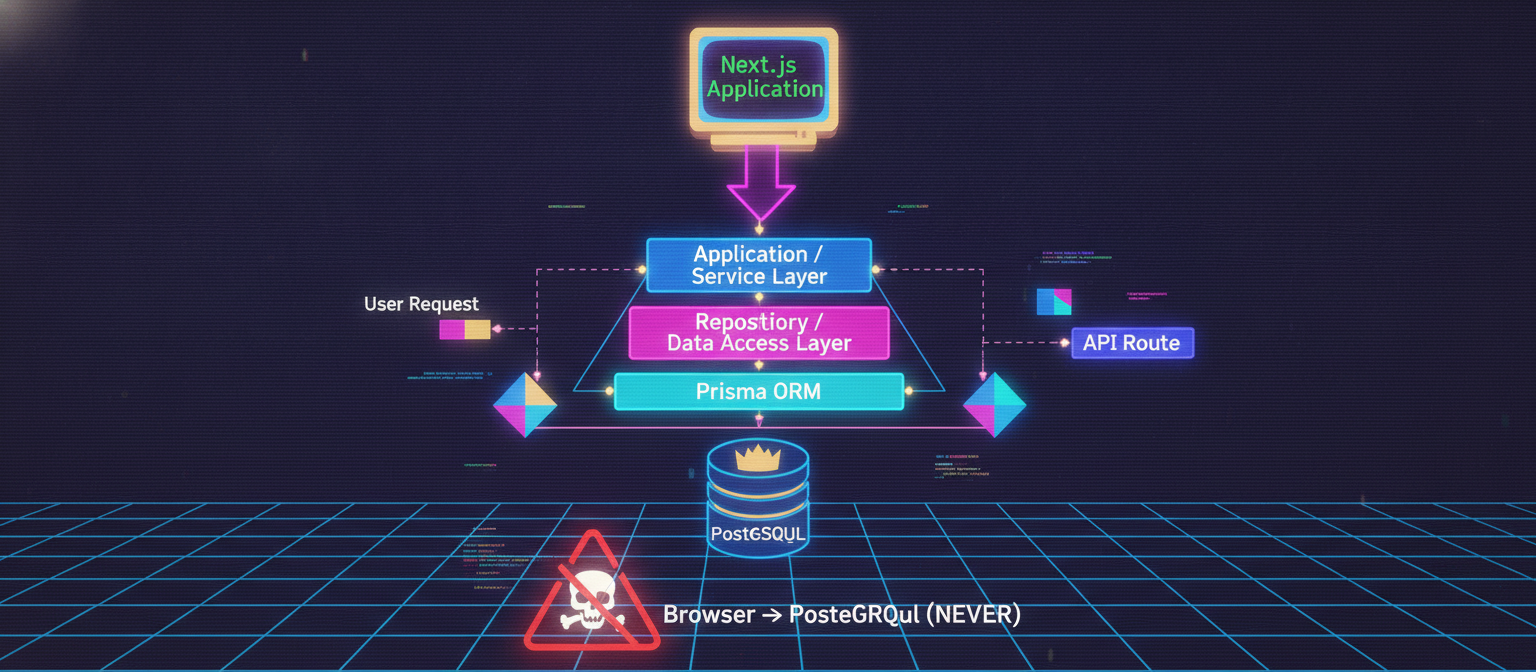
The architecture becomes:
Next.js Application
        │
        ▼
Application / Service Layer
        │
        ▼
Repository / Data Access Layer
        │
        ▼
Prisma ORM
        │
        ▼
PostgreSQL
The browser must never communicate directly with PostgreSQL.
37.2 Implementation Objectives
At the end of this chapter, the system should support the following flow:
User Request
     │
     ▼
API Route / Server Action
     │
     ▼
Validation
     │
     ▼
Service Layer
     │
     ▼
Repository
     │
     ▼
Prisma
     │
     ▼
PostgreSQL
The initial implementation will establish:
PostgreSQL connection
Prisma installation
Prisma schema
Database migration
Prisma Client generation
Database seed
Database singleton
Repository functions
CRUD operations
Transaction handling
API endpoint
Error handling
Development database verification
37.3 Project Structure
A recommended project structure is:
acai/
│
├── src/
│   ├── app/
│   │   └── api/
│   │       └── users/
│   │           └── route.ts
│   │
│   ├── lib/
│   │   ├── prisma.ts
│   │   └── validation.ts
│   │
│   ├── repositories/
│   │   └── user.repository.ts
│   │
│   └── services/
│       └── user.service.ts
│
├── prisma/
│   ├── schema.prisma
│   └── seed.ts
│
├── .env
├── .env.example
├── package.json
└── tsconfig.json
This separation is important.
The API route should not contain large amounts of database logic.
Instead:
API
 ↓
Service
 ↓
Repository
 ↓
Prisma
This makes the system easier to test and maintain.
37.4 Installing Prisma
From the project root:
npm install prisma @prisma/client
If PowerShell prevents the npm command from running, use:
npm.cmd install prisma @prisma/client
Alternatively, open Command Prompt (cmd.exe) and execute the normal command.
Initialize Prisma:
npx prisma init
If necessary:
npx.cmd prisma init
This creates:
prisma/
└── schema.prisma

.env
37.5 PostgreSQL Database
Create a PostgreSQL database for development.
Example database name:
acai_dev
The connection string conceptually looks like:
postgresql://USERNAME:PASSWORD@HOST:PORT/DATABASE
For a local installation, an example might be:
postgresql://postgres:YOUR_PASSWORD@localhost:5432/acai_dev
The actual password must never be committed to Git.
37.6 Environment Configuration
The .env file should contain the database connection:
DATABASE_URL="postgresql://postgres:YOUR_PASSWORD@localhost:5432/acai_dev"
Do not place the real password into source-controlled files.
Create .env.example:
DATABASE_URL="postgresql://USER:PASSWORD@HOST:5432/DATABASE"
The .env.example file is safe to commit because it contains a placeholder.
The real .env should be excluded from Git.
Example .gitignore:
node_modules
.next
.env
.env.local
.env.production
37.7 Initial Prisma Schema
The initial schema should remain manageable.
A practical first implementation can start with:
User
Project
Conversation
Message
File
AuditLog
Additional models can be introduced through later migrations.
Example:
generator client {
  provider = "prisma-client-js"
}

datasource db {
  provider = "postgresql"
  url      = env("DATABASE_URL")
}

enum UserStatus {
  ACTIVE
  SUSPENDED
  DELETED
}

enum ProjectStatus {
  ACTIVE
  ARCHIVED
  DELETED
}

enum ConversationStatus {
  ACTIVE
  ARCHIVED
  DELETED
}

enum MessageRole {
  SYSTEM
  USER
  ASSISTANT
  TOOL
}

enum FileStatus {
  UPLOADING
  UPLOADED
  PROCESSING
  READY
  FAILED
  DELETED
}

model User {
  id           String       @id @default(uuid())
  email        String       @unique
  name         String?
  status       UserStatus   @default(ACTIVE)

  projects     Project[]
  conversations Conversation[]
  files        File[]
  auditLogs    AuditLog[]

  createdAt    DateTime     @default(now())
  updatedAt    DateTime     @updatedAt
}

model Project {
  id           String        @id @default(uuid())
  name         String
  description  String?
  status       ProjectStatus  @default(ACTIVE)

  ownerId      String
  owner        User          @relation(fields: [ownerId], references: [id], onDelete: Cascade)

  conversations Conversation[]
  files         File[]

  createdAt    DateTime      @default(now())
  updatedAt    DateTime      @updatedAt

  @@index([ownerId])
  @@index([status])
}

model Conversation {
  id           String             @id @default(uuid())
  title        String?
  status       ConversationStatus @default(ACTIVE)

  userId       String
  user          User              @relation(fields: [userId], references: [id], onDelete: Cascade)

  projectId    String?
  project      Project?           @relation(fields: [projectId], references: [id], onDelete: SetNull)

  messages     Message[]

  createdAt    DateTime           @default(now())
  updatedAt    DateTime           @updatedAt

  @@index([userId])
  @@index([projectId])
}

model Message {
  id             String       @id @default(uuid())
  role           MessageRole
  content        String

  conversationId String
  conversation   Conversation @relation(fields: [conversationId], references: [id], onDelete: Cascade)

  metadata       Json?

  createdAt      DateTime     @default(now())

  @@index([conversationId])
}

model File {
  id          String     @id @default(uuid())
  name        String
  mimeType    String
  sizeBytes   BigInt
  status      FileStatus @default(UPLOADING)

  ownerId     String
  owner       User       @relation(fields: [ownerId], references: [id], onDelete: Cascade)

  projectId   String?
  project     Project?   @relation(fields: [projectId], references: [id], onDelete: SetNull)

  storageKey  String?

  metadata    Json?

  createdAt   DateTime   @default(now())
  updatedAt   DateTime   @updatedAt

  @@index([ownerId])
  @@index([projectId])
  @@index([status])
}

model AuditLog {
  id          String   @id @default(uuid())

  userId      String?
  user        User?    @relation(fields: [userId], references: [id], onDelete: SetNull)

  action      String
  resource    String?
  resourceId  String?
  metadata    Json?

  createdAt   DateTime @default(now())

  @@index([userId])
  @@index([action])
  @@index([resource])
  @@index([createdAt])
}
This schema represents the first executable database layer.
37.8 Understanding Relationships
The most important relationships are:
User
 │
 ├── Projects
 │
 ├── Conversations
 │      │
 │      └── Messages
 │
 ├── Files
 │
 └── Audit Logs
A user can own multiple projects.
A project can contain multiple conversations.
A conversation can contain multiple messages.
A user can own multiple files.
Audit records can optionally identify the user responsible for an action.
37.9 Running the First Migration
After configuring the schema:
npx prisma migrate dev --name init
Or:
npx.cmd prisma migrate dev --name init
Prisma will create a migration directory similar to:
prisma/
└── migrations/
    └── 20260904_init/
        └── migration.sql
The exact generated folder name may differ.
The migration is the version-controlled history of database structure.
37.10 Why Migrations Matter
Without migrations, developers may manually change databases and eventually lose track of what changed.
With migrations:
Migration 001
     ↓
Migration 002
     ↓
Migration 003
     ↓
Migration 004
Every environment can progressively reach the same schema state.
A migration should be treated as part of the application's source code.
37.11 Prisma Client
After the schema has been processed, Prisma Client provides typed database access.
Example:
import { PrismaClient } from "@prisma/client";

const prisma = new PrismaClient();
However, creating a new Prisma client repeatedly during development can create too many database connections.
Therefore the application should use a singleton pattern.
37.12 Prisma Singleton
Create:
src/lib/prisma.ts
Code:
import { PrismaClient } from "@prisma/client";

const globalForPrisma = globalThis as unknown as {
  prisma: PrismaClient | undefined;
};

export const prisma =
  globalForPrisma.prisma ??
  new PrismaClient();

if (process.env.NODE_ENV !== "production") {
  globalForPrisma.prisma = prisma;
}
The application can now import:
import { prisma } from "@/lib/prisma";
This creates a consistent database access point.
37.13 Repository Layer
Create:
src/repositories/user.repository.ts
Example:
import { prisma } from "@/lib/prisma";

export async function createUser(
  email: string,
  name?: string
) {
  return prisma.user.create({
    data: {
      email,
      name,
    },
  });
}

export async function findUserById(id: string) {
  return prisma.user.findUnique({
    where: {
      id,
    },
  });
}

export async function findUserByEmail(email: string) {
  return prisma.user.findUnique({
    where: {
      email,
    },
  });
}

export async function updateUser(
  id: string,
  data: {
    name?: string;
  }
) {
  return prisma.user.update({
    where: {
      id,
    },
    data,
  });
}
The repository abstracts database operations.
The API does not need to know how Prisma queries PostgreSQL.
37.14 Service Layer
Create:
src/services/user.service.ts
Example:
import {
  createUser,
  findUserByEmail,
} from "@/repositories/user.repository";

export async function registerUser(
  email: string,
  name?: string
) {
  const existingUser =
    await findUserByEmail(email);

  if (existingUser) {
    throw new Error("User already exists");
  }

  return createUser(email, name);
}
The service layer contains business rules.
The repository contains database access.
This distinction is important.
Repository = HOW data is stored/retrieved

Service = WHY and WHEN an operation is allowed
37.15 API Route
Create:
src/app/api/users/route.ts
Example:
import { NextResponse } from "next/server";
import { registerUser } from "@/services/user.service";

export async function POST(request: Request) {
  try {
    const body = await request.json();

    const email = body.email;
    const name = body.name;

    if (!email || typeof email !== "string") {
      return NextResponse.json(
        {
          error: "Valid email is required",
        },
        {
          status: 400,
        }
      );
    }

    const user = await registerUser(
      email,
      name
    );

    return NextResponse.json(
      {
        id: user.id,
        email: user.email,
        name: user.name,
      },
      {
        status: 201,
      }
    );
  } catch (error) {
    console.error(error);

    return NextResponse.json(
      {
        error: "Unable to create user",
      },
      {
        status: 500,
      }
    );
  }
}
The browser now communicates with the API rather than directly with PostgreSQL.
37.16 Database Read Operation
A server-side operation can retrieve a user:
import { prisma } from "@/lib/prisma";

const user = await prisma.user.findUnique({
  where: {
    email: "user@example.com",
  },
});
The result can then be processed by the application.
37.17 Database Update Operation
Example:
const updatedUser =
  await prisma.user.update({
    where: {
      id: userId,
    },
    data: {
      name: "Updated Name",
    },
  });
Only the intended fields should be updated.
37.18 Database Delete Operation
A hard delete can be performed using:
await prisma.user.delete({
  where: {
    id: userId,
  },
});
However, for important records, hard deletion should be considered carefully.
For many production systems, a soft-delete strategy is preferable.
For example:
status = DELETED
rather than immediately destroying the record.
37.19 Transactions
Some operations require multiple database changes to succeed together.
For example:
Create Project
     +
Create Audit Log
If project creation succeeds but audit logging fails, the system may become inconsistent.
A transaction can solve this.
Example:
const result = await prisma.$transaction(
  async (tx) => {
    const project = await tx.project.create({
      data: {
        name: "Research Project",
        ownerId: userId,
      },
    });

    await tx.auditLog.create({
      data: {
        userId,
        action: "PROJECT_CREATED",
        resource: "project",
        resourceId: project.id,
      },
    });

    return project;
  }
);
The intended principle is:
Transaction starts
       ↓
Operation A
       ↓
Operation B
       ↓
Success
       ↓
Commit
If a required operation fails:
Transaction starts
       ↓
Operation A
       ↓
Operation B fails
       ↓
Rollback
This prevents partially completed database workflows.
37.20 Seed Data
Development environments benefit from predictable sample data.
Create:
prisma/seed.ts
Example:
import {
  PrismaClient,
  UserStatus,
} from "@prisma/client";

const prisma = new PrismaClient();

async function main() {
  const user = await prisma.user.upsert({
    where: {
      email: "demo@example.com",
    },
    update: {},
    create: {
      email: "demo@example.com",
      name: "Demo User",
      status: UserStatus.ACTIVE,
    },
  });

  const project =
    await prisma.project.create({
      data: {
        name: "Demo Project",
        description:
          "Development demonstration project",
        ownerId: user.id,
      },
    });

  const conversation =
    await prisma.conversation.create({
      data: {
        title: "Demo Conversation",
        userId: user.id,
        projectId: project.id,
      },
    });

  await prisma.message.create({
    data: {
      conversationId: conversation.id,
      role: "USER",
      content: "Hello ACAI.",
    },
  });

  console.log("Seed completed.");
}

main()
  .catch((error) => {
    console.error(error);
    process.exit(1);
  })
  .finally(async () => {
    await prisma.$disconnect();
  });
The seed system should only contain non-sensitive development data.
Do not insert real user credentials, API keys, payment information, or private files.
37.21 Database Inspection
Prisma provides a visual database interface:
npx prisma studio
This allows developers to inspect records during development.
For example:
User
 ├── demo@example.com
 │
Project
 └── Demo Project
     │
Conversation
     └── Demo Conversation
         │
Message
         └── Hello ACAI.
This is particularly useful when learning database relationships.
37.22 Development Workflow
The recommended workflow is:
1. Edit schema.prisma
        ↓
2. Create migration
        ↓
3. Apply migration
        ↓
4. Generate Prisma Client
        ↓
5. Seed development data
        ↓
6. Start application
        ↓
7. Test API
        ↓
8. Inspect database
Typical development commands:
npx prisma migrate dev
npx prisma generate
npx prisma studio
The exact seed command/configuration should follow the Prisma version installed in the project.
37.23 Database Security Boundary
The architecture must enforce:
Browser
   │
   │ HTTPS
   ▼
Next.js API
   │
   │ Server-side credentials
   ▼
Prisma
   │
   ▼
PostgreSQL
Never:
Browser
   │
   ▼
PostgreSQL
Never expose:
DATABASE_URL
POSTGRES_PASSWORD
DATABASE_USERNAME
PRIVATE_DATABASE_HOST
to client-side JavaScript.
37.24 Input Validation
Database constraints are not a replacement for application validation.
For example:
Application validation
        +
Database constraints
        +
Authorization
should work together.
An email field should be validated before attempting the database operation.
A project ID should be checked for ownership before allowing modifications.
A user should not be able to modify another user's project merely because they know its identifier.
37.25 Authorization
A request such as:
PATCH /api/projects/123
must not mean:
"If project 123 exists, modify it."
Instead:
Authenticate user
      ↓
Find project
      ↓
Check ownership/access
      ↓
Validate requested change
      ↓
Update project
      ↓
Write audit event
This prevents a common class of access-control failures.
37.26 Audit Logging
Security-sensitive operations should be auditable.
Examples include:
USER_CREATED
PROJECT_CREATED
PROJECT_UPDATED
PROJECT_DELETED
FILE_UPLOADED
FILE_DELETED
API_KEY_CREATED
API_KEY_REVOKED
MODEL_REQUEST_STARTED
MODEL_REQUEST_COMPLETED
MODEL_REQUEST_FAILED
ADMIN_ACTION
Audit logs should avoid storing unnecessary sensitive information.
For example, do not place passwords or secret API keys inside:
metadata
37.27 Error Handling
Database errors should not be exposed directly to end users.
Bad:
{
  "error": "PrismaClientKnownRequestError: ..."
}
Better:
{
  "error": "Unable to complete the requested operation."
}
Detailed technical errors should be logged securely on the server.
The user receives a safe error message.
37.28 Development, Staging and Production
The database environment should be separated:
Development
    ↓
PostgreSQL Development DB

Staging
    ↓
PostgreSQL Staging DB

Production
    ↓
PostgreSQL Production DB
Never use the production database as a testing playground.
A developer should not run destructive reset commands against production.
37.29 Database Reset During Development
During early development, developers may need to reset the local database.
This is acceptable only for disposable development data.
Production databases must use controlled migration and recovery procedures instead.
The fundamental rule is:
Development data = disposable

Production data = protected
37.30 First End-to-End Test
Start PostgreSQL.
Verify:
DATABASE_URL
Then run migrations.
Start the Next.js application:
npm run dev
If PowerShell blocks npm scripts:
npm.cmd run dev
Then send a POST request to:
/api/users
with:
{
  "email": "test@example.com",
  "name": "Test User"
}
The expected conceptual flow is:
HTTP Request
     ↓
Next.js API
     ↓
Validation
     ↓
User Service
     ↓
User Repository
     ↓
Prisma
     ↓
PostgreSQL
     ↓
Created User
     ↓
JSON Response
37.31 Verification Checklist
Before continuing to the next chapter, verify:
[ ] PostgreSQL is running
[ ] DATABASE_URL exists
[ ] Prisma is installed
[ ] schema.prisma exists
[ ] Migration completed
[ ] Prisma Client generated
[ ] Database tables exist
[ ] Seed data can be inserted
[ ] Prisma Studio opens
[ ] Prisma singleton works
[ ] Repository works
[ ] Service works
[ ] API route works
[ ] Transaction example works
[ ] .env is ignored by Git
[ ] No credentials are exposed to the browser
37.32 Failure Isolation
If the system fails, diagnose from the bottom upward.
Case 1 — PostgreSQL unavailable
Check:
PostgreSQL service
     ↓
Host
     ↓
Port
Case 2 — Authentication failure
Check:
Username
Password
Database
Case 3 — Prisma migration failure
Check:
schema.prisma
DATABASE_URL
database permissions
existing schema
Case 4 — API failure
Check:
API route
     ↓
Service
     ↓
Repository
     ↓
Prisma
Case 5 — Client-side database error
This usually indicates an architectural mistake.
Database access should remain server-side.
37.33 Architectural Result
At the end of Chapter 37, the architecture has moved from conceptual design to a working implementation:
                 ACAI
                   │
          ┌────────┴────────┐
          │                 │
       Frontend           Backend
          │                 │
          │             API Routes
          │                 │
          │             Services
          │                 │
          │            Repositories
          │                 │
          │              Prisma
          │                 │
          └────────── PostgreSQL
The database is now a real executable component rather than merely a design document.
37.34 Security Principle
The most important principle introduced in this chapter is separation of responsibility.
UI
 ↓
API
 ↓
Validation
 ↓
Authorization
 ↓
Service
 ↓
Repository
 ↓
ORM
 ↓
Database
Each layer has a defined responsibility.
This makes the system easier to audit, test, secure, and extend.
37.35 Conclusion
Chapter 37 established the first concrete database implementation for ACAI.
The system now has:
PostgreSQL as the relational database;
Prisma as the ORM;
version-controlled migrations;
typed database access;
a reusable Prisma singleton;
repository abstraction;
service-layer business logic;
API integration;
transactions;
development seed data;
database inspection;
security boundaries;
environment separation;
audit logging foundations.
This provides the foundation required for the next major subsystem.
The next chapter will extend the database layer into authentication, sessions, user identity, authorization, ownership checks, role-based access control, and secure API access, while keeping database credentials and privileged operations strictly server-side.
END OF CHAPTER 37