
ACAI — Chapter 38: Authentication, Sessions, Authorization & Access Control
38.1 Introduction
Chapter 37 transformed the database architecture into a working PostgreSQL and Prisma implementation.
The next requirement is identity.
A database can store users, projects, files, conversations, and audit events, but the application must know:
Who is making a request?
Is that user authenticated?
Is the session still valid?
What resources does the user own?
What actions is the user permitted to perform?
Does the user have an administrator or ordinary-user role?
Should a particular operation require additional approval?
Therefore, authentication and authorization become a critical security boundary.
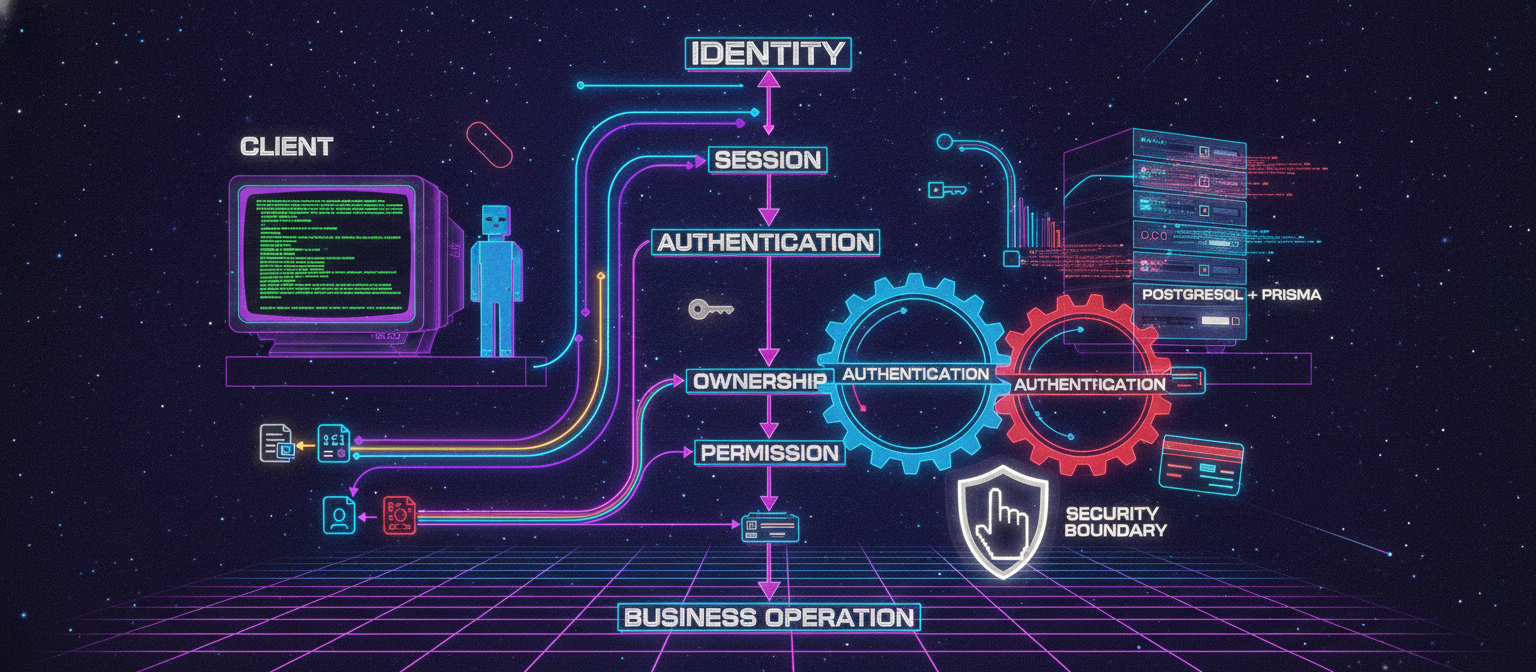
The fundamental architecture is:
Client
  │
  ▼
Authentication
  │
  ▼
Session
  │
  ▼
Identity
  │
  ▼
Authorization
  │
  ▼
Resource Ownership
  │
  ▼
Business Operation
Authentication answers:
"Who are you?"
Authorization answers:
"What are you allowed to do?"
These are different security functions and should not be confused.
38.2 Authentication vs Authorization
Authentication verifies identity.
Examples:
Email + Password
OAuth
Passkey
Magic Link
Multi-Factor Authentication
Authorization determines permissions.
Examples:
User
Admin
Project Owner
Project Member
Reviewer
System Operator
A user can be successfully authenticated and still be unauthorized to access a resource.
For example:
User A → authenticated
Project B → owned by User B
Authentication succeeds.
Authorization must reject the operation.
38.3 Security Model
The application should follow:
REQUEST
   │
   ▼
Is request structurally valid?
   │
   ▼
Is user authenticated?
   │
   ▼
Does user have permission?
   │
   ▼
Does user own/access resource?
   │
   ▼
Is operation allowed?
   │
   ▼
Execute
A failure at any security boundary should stop the operation.
38.4 Extending the User Model
The user model can be extended with a role.
Example:
enum UserRole {
  USER
  ADMIN
}

model User {
  id           String     @id @default(uuid())
  email        String     @unique
  name         String?
  status       UserStatus @default(ACTIVE)
  role         UserRole   @default(USER)

  createdAt    DateTime   @default(now())
  updatedAt    DateTime   @updatedAt
}
A migration is then created:
npx prisma migrate dev --name add_user_role
The migration should be reviewed before being applied to important environments.
38.5 Session Model
A production application needs a controlled session mechanism.
A conceptual session table can contain:
Session
 ├── id
 ├── userId
 ├── tokenHash
 ├── expiresAt
 ├── createdAt
 ├── lastUsedAt
 └── revokedAt
Example Prisma model:
model Session {
  id         String    @id @default(uuid())

  userId     String
  user       User      @relation(fields: [userId], references: [id], onDelete: Cascade)

  tokenHash  String    @unique

  expiresAt  DateTime
  lastUsedAt DateTime?
  revokedAt  DateTime?

  createdAt  DateTime  @default(now())

  @@index([userId])
  @@index([expiresAt])
  @@index([revokedAt])
}
The raw session token should not be stored unnecessarily.
A safer pattern is:
Random session token
        │
        ▼
Hash
        │
        ▼
Database
The server can compare a presented token against the stored representation.
38.6 Session Lifecycle
A session follows:
LOGIN
  │
  ▼
Credentials verified
  │
  ▼
Session created
  │
  ▼
Secure cookie issued
  │
  ▼
Authenticated requests
  │
  ▼
Session validation
  │
  ├── Valid → continue
  │
  └── Expired/revoked → reject
Logout:
LOGOUT
  │
  ▼
Session revoked
  │
  ▼
Cookie removed
38.7 Password Storage
Passwords must never be stored as plaintext.
Bad:
password = "mypassword123"
The database should instead contain a password hash.
Conceptually:
Password
   │
   ▼
Password Hashing Function
   │
   ▼
Password Hash
   │
   ▼
Database
A modern password hashing algorithm designed for password storage should be used.
The application should never attempt to decrypt a password.
Password verification works by comparing a supplied password against the stored password hash.
38.8 Login Flow
A login request should conceptually follow:
POST /api/auth/login
          │
          ▼
Validate input
          │
          ▼
Find user
          │
          ▼
Check account status
          │
          ▼
Verify password
          │
          ▼
Create session
          │
          ▼
Set secure cookie
          │
          ▼
Return safe user information
The response should not expose:
passwordHash
sessionToken
private keys
internal database information
38.9 Secure Cookie Principles
For browser sessions, cookies should normally be configured with security properties such as:
HttpOnly
Secure
SameSite
appropriate expiration
The purpose is to reduce unnecessary exposure of authentication material to client-side scripts and cross-site request scenarios.
The exact configuration should depend on the application's deployment architecture.
38.10 Current User Resolution
Create a server-side helper such as:
src/lib/auth.ts
Conceptually:
export async function getCurrentUser() {
  // Read session information
  // Validate session
  // Load user
  // Return user or null
}
The helper becomes the central identity-resolution mechanism.
Example usage:
const user = await getCurrentUser();

if (!user) {
  throw new Error("Unauthorized");
}
The application should avoid duplicating authentication logic across every API route.
38.11 Authorization Helper
Authentication alone is insufficient.
A helper can enforce authorization:
export async function requireUser() {
  const user = await getCurrentUser();

  if (!user) {
    throw new Error("Unauthorized");
  }

  return user;
}
For administrative operations:
export async function requireAdmin() {
  const user = await requireUser();

  if (user.role !== "ADMIN") {
    throw new Error("Forbidden");
  }

  return user;
}
The distinction is:
Unauthorized = identity not established

Forbidden = identity established but permission denied
38.12 Resource Ownership
Consider:
GET /api/projects/abc123
The existence of project abc123 does not automatically authorize access.
The server should evaluate:
Current User
      │
      ▼
Project
      │
      ▼
Ownership / Membership
      │
      ▼
Permission
Example repository query:
const project = await prisma.project.findFirst({
  where: {
    id: projectId,
    ownerId: userId,
  },
});
If no record is returned, the server should not disclose whether a protected resource exists unless the application's policy explicitly permits such disclosure.
38.13 Ownership Check Pattern
A safe service operation might look like:
export async function getUserProject(
  userId: string,
  projectId: string
) {
  const project = await prisma.project.findFirst({
    where: {
      id: projectId,
      ownerId: userId,
    },
  });

  if (!project) {
    throw new Error("Project not found");
  }

  return project;
}
The important property is that the authorization condition is included in the database query itself.
38.14 Role-Based Access Control
The first role system can be simple:
USER
ADMIN
Later it can become more granular:
USER
PROJECT_MEMBER
PROJECT_OWNER
REVIEWER
ADMIN
SYSTEM_OPERATOR
However, roles should not be created merely because they sound useful.
Every role should have a clearly documented permission set.
Example:
| Role | View Own Data | Manage Own Projects | Manage Users |
|---|---|---|---|
| USER | Yes | Yes | No |
| ADMIN | Yes | Yes | Yes |
38.15 Permission-Based Design
For larger systems, permissions can be represented explicitly:
project.read
project.create
project.update
project.delete

file.read
file.upload
file.delete

conversation.read
conversation.create

admin.users.read
admin.users.update
Then roles can map to permissions.
Conceptually:
Role
  │
  ├── Permission A
  ├── Permission B
  └── Permission C
This is more flexible than embedding dozens of role-specific conditions throughout application code.
38.16 API Protection
Every protected API endpoint should have an explicit security boundary.
Example:
export async function GET() {
  const user = await requireUser();

  // Continue only after authentication.
}
For a project operation:
export async function PATCH(
  request: Request,
  context: {
    params: {
      id: string;
    };
  }
) {
  const user = await requireUser();

  const project =
    await getUserProject(
      user.id,
      context.params.id
    );

  // Authorized operation continues here.
}
38.17 Never Trust Client-Supplied Identity
A dangerous pattern is:
{
  "userId": "some-id",
  "name": "new name"
}
followed by:
await updateUser(body.userId, ...)
The client should not be trusted to determine which authenticated identity is making the request.
Instead:
Authenticated Session
       │
       ▼
Server determines userId
       │
       ▼
Operation
If the request body contains a user ID, it should not override the authenticated identity.
38.18 Authentication Rate Limiting
Login endpoints are security-sensitive.
A system should consider controls such as:
Rate limiting
Credential attempt monitoring
Temporary throttling
Account protection
Suspicious activity detection
The objective is to reduce automated abuse without unnecessarily blocking legitimate users.
38.19 Session Expiration
Sessions should have expiration policies.
Example conceptual lifecycle:
Session created
      │
      ▼
Active
      │
      ├── User logs out → Revoked
      │
      ├── Admin revokes → Revoked
      │
      └── Expiration reached → Expired
The server should validate expiration before granting access.
38.20 Session Revocation
A security-conscious system should be able to revoke sessions.
Examples:
User logs out
Password changed
Account compromised
Administrator disables account
Suspicious session detected
The system can mark:
revokedAt = current time
rather than relying only on client-side cookie removal.
38.21 Multiple Sessions
Users may have multiple active devices:
Laptop
   │
   └── Session A

Phone
   │
   └── Session B

Tablet
   │
   └── Session C
A session-management interface can eventually allow the user to see and revoke individual sessions.
38.22 Account Status
Authentication should also respect account state.
For example:
ACTIVE
SUSPENDED
DELETED
A suspended account may have valid credentials but should still be denied access.
Therefore:
Valid credentials
        +
ACTIVE account
        +
Valid session
        =
Authenticated request
38.23 Admin Protection
Administrative functionality requires additional safeguards.
A basic model:
Normal User
    ↓
Standard API

Admin
    ↓
Admin API
    ↓
Permission Check
    ↓
Audit Log
Administrative actions should generate audit events.
Example:
ADMIN_USER_SUSPENDED
ADMIN_USER_RESTORED
ADMIN_PROJECT_REVIEWED
ADMIN_CONFIGURATION_CHANGED
38.24 Audit Integration
Authentication events should connect to the existing audit system.
Examples:
LOGIN_SUCCESS
LOGIN_FAILURE
LOGOUT
SESSION_CREATED
SESSION_REVOKED
PASSWORD_CHANGED
ACCOUNT_SUSPENDED
ROLE_CHANGED
The audit system should avoid storing sensitive credentials.
38.25 Security Event Data
A useful audit record may include:
userId
action
resource
resourceId
timestamp
request identifier
result
Potentially useful metadata:
authentication method
application version
device category
Only collect information that is justified by the security and operational requirements.
38.26 Authentication Error Messages
Avoid revealing unnecessary account information.
For example, overly specific responses can disclose whether an account exists.
A safer external response can be intentionally generic:
Authentication failed.
Detailed diagnostics remain server-side.
38.27 Database Constraints
Authentication security should not depend only on application code.
The database should enforce constraints such as:
email UNIQUE
session token hash UNIQUE
foreign-key integrity
non-null required fields
Application validation and database constraints complement one another.
38.28 Security Testing
Authentication should be tested systematically.
Minimum test categories:
Valid login
Invalid password
Unknown account
Expired session
Revoked session
Suspended account
Unauthenticated request
Unauthorized resource access
Admin-only operation
Logout
Multiple sessions
Example:
Test:
User A requests User B's project.

Expected:
Access denied.
Another:
Test:
Normal user calls admin endpoint.

Expected:
Forbidden.
38.29 Authorization Test Matrix
A useful matrix is:
| Operation | Anonymous | User | Owner | Admin |
|---|---|---|---|---|
| Public landing page | ✓ | ✓ | ✓ | ✓ |
| Create own project | ✗ | ✓ | ✓ | ✓ |
| Read own project | ✗ | ✓ | ✓ | ✓ |
| Modify another user's project | ✗ | ✗ | ✗ | Policy-dependent |
| User administration | ✗ | ✗ | ✗ | ✓ |
The actual matrix must be defined by the application's requirements.
38.30 Defense-in-Depth
Authentication should not be the only security mechanism.
The system should combine:
Input Validation
        +
Authentication
        +
Authorization
        +
Ownership Checks
        +
Database Constraints
        +
Rate Limiting
        +
Audit Logging
        +
Monitoring
If one control fails, other controls can still reduce the impact.
38.31 Zero-Trust Request Handling
A useful principle is:
Every request should be treated as untrusted until the server validates it.
That means:
Client-provided ID
Client-provided role
Client-provided ownership
Client-provided permission
should never be accepted as authoritative.
The server determines identity and authorization.
38.32 Authentication Architecture
The resulting architecture becomes:
                   Request
                      │
                      ▼
               Input Validation
                      │
                      ▼
               Session Resolver
                      │
                      ▼
                Current User
                      │
                      ▼
              Authorization
                      │
          ┌───────────┴───────────┐
          │                       │
       Allowed                 Denied
          │                       │
          ▼                       ▼
    Service Layer              403/401
          │
          ▼
     Repository
          │
          ▼
       Prisma
          │
          ▼
     PostgreSQL
38.33 Recommended Authentication Boundaries
The application should have centralized functions for:
getCurrentUser()
requireUser()
requireAdmin()
requireProjectOwner()
requirePermission()
createSession()
revokeSession()
Centralization reduces inconsistent security logic.
38.34 Future Authentication Extensions
The architecture can later support:
Email verification
Password reset
Multi-factor authentication
Passkeys
OAuth providers
Device management
Session management
Security notifications
Recovery codes
Adaptive authentication
These should be introduced incrementally.
A simple, auditable authentication system is preferable to a complicated system that is difficult to verify.
38.35 Security Research Perspective
Authentication and authorization are particularly important in AI platforms because AI functionality often operates on valuable resources:
Uploaded documents
Private conversations
Generated media
API usage
Model configurations
Stored memories
Agent tasks
Connected tools
A failure in access control can therefore expose more than ordinary profile information.
For an AI platform, authorization should be applied to the resources used by the AI system itself.
38.36 AI-Specific Authorization
An AI assistant should not automatically inherit unrestricted access to every resource belonging to a user.
Instead:
User
 │
 ▼
Authorized Context
 │
 ├── Project A
 ├── Selected Files
 ├── Selected Conversations
 └── Approved Tools
The model receives only the context required for the task.
This creates an additional security boundary between:
User permissions
and
AI execution permissions
38.37 Agent Permission Boundary
For future agent functionality:
Agent
 │
 ▼
Requested Action
 │
 ▼
Policy Check
 │
 ├── Allowed → Execute
 │
 └── Approval Required → Pause
The model should not be treated as an authority that can grant itself permissions.
Authorization belongs to the application.
38.38 Human Approval
Sensitive operations can use:
REQUEST
  ↓
POLICY CHECK
  ↓
APPROVAL REQUIRED
  ↓
HUMAN REVIEW
  ↓
APPROVED / REJECTED
This becomes particularly useful for actions that have external side effects.
The approval decision should be auditable.
38.39 Chapter 38 Security Checklist
[ ] Passwords are never stored in plaintext
[ ] Session data is protected
[ ] Sessions can expire
[ ] Sessions can be revoked
[ ] Cookies use appropriate security settings
[ ] Authentication is server-side
[ ] Authorization is server-side
[ ] Client-supplied user IDs are not trusted
[ ] Ownership is verified
[ ] Admin operations require authorization
[ ] Sensitive actions are audited
[ ] Account status is checked
[ ] Login abuse controls exist
[ ] Protected APIs require authentication
[ ] AI resources have authorization boundaries
[ ] Agent actions have explicit permissions
38.40 Conclusion
Chapter 38 established the identity and access-control layer.
The resulting security model is:
Identity
   ↓
Session
   ↓
Authentication
   ↓
Authorization
   ↓
Ownership
   ↓
Permission
   ↓
Business Operation
This prevents a major architectural mistake: treating authentication as the entire security system.
Authentication establishes identity.
Authorization establishes permission.
Ownership establishes resource boundaries.
Audit logging establishes accountability.
Together, these form the foundation for a secure multi-user AI platform.
The next chapter will move into API architecture and request processing, including route organization, validation, response contracts, error handling, rate limiting, request IDs, service boundaries, and secure communication between the frontend and backend.
END OF CHAPTER 38