
Chapter 73 — Secure AI Platform Administration & Privileged Access
73.1 Introduction
Administrative access is one of the highest-risk areas of an AI platform.
A normal user may be allowed to:
create projects,
upload files,
generate content,
manage their own data.
An administrator may be able to:
access configuration,
manage users,
change policies,
rotate credentials,
modify infrastructure,
inspect security events,
change AI providers,
modify model settings,
control billing,
disable services.
Therefore, administrative access must be treated as a privileged security boundary.
The fundamental principle is:
Administrative access should be minimal, strongly authenticated, explicitly authorized, monitored, and reversible whenever possible.
73.2 Privileged Access
Privileged access is access that can significantly affect the security or operation of the platform.
Examples include:
User Management
       ↓
Policy Management
       ↓
Security Configuration
       ↓
Secrets Management
       ↓
Infrastructure Management
       ↓
Database Administration
       ↓
Model Management
       ↓
Billing Administration
Not every administrator needs access to every layer.
73.3 Least Privilege
An administrator should receive only the permissions necessary for their responsibilities.
Instead of:
Admin
 ↓
Everything
prefer:
Security Admin
 ↓
Security controls only

AI Admin
 ↓
Model/configuration controls

Support Admin
 ↓
Limited user-support controls

Billing Admin
 ↓
Billing controls
This reduces blast radius.
73.4 Privilege Separation
Critical responsibilities should be separated when practical.
For example:
Developer
   ≠
Production Administrator
   ≠
Security Administrator
   ≠
Billing Administrator
This reduces the possibility that one compromised account can control the entire platform.
73.5 Administrative Roles
A possible role hierarchy is:
| Role | Typical Responsibility |
|---|---|
| Support Admin | User support |
| Content Admin | Moderation/content operations |
| AI Admin | Model/provider configuration |
| Security Admin | Security controls |
| Billing Admin | Billing operations |
| Infrastructure Admin | Infrastructure |
| Database Admin | Database operations |
| Super Admin | Exceptional platform control |
The exact roles should be determined by the application's risk model.
73.6 RBAC
Role-Based Access Control assigns permissions through roles.
Example:
Role:
AI_ADMIN

Permissions:
model.read
model.evaluate
model.approve
provider.configure
The administrator receives permissions through the role.
RBAC is easier to manage than assigning hundreds of individual permissions manually.
73.7 ABAC
Attribute-Based Access Control can make authorization more contextual.
For example:
User role = SecurityAdmin
AND
Environment = Production
AND
Operation = HighRisk
AND
MFA = Verified
AND
Approval = Present
Only then is access granted.
ABAC can therefore complement RBAC.
73.8 Permission Design
Permissions should represent specific capabilities.
Examples:
user.read
user.disable

project.read
project.delete

model.read
model.deploy
model.rollback

policy.read
policy.update

audit.read

secret.rotate

billing.read
billing.refund
Avoid overly broad permissions such as:
system.full_access
unless genuinely necessary.
73.9 Administrative Authentication
Administrative accounts should use stronger authentication than ordinary accounts where practical.
Controls may include:
phishing-resistant MFA
hardware-backed authentication
strong passwords where applicable
short-lived sessions
device controls
IP/network restrictions where appropriate
step-up authentication
A stolen administrator password should not automatically provide unrestricted control.
73.10 Step-Up Authentication
Some actions deserve additional authentication.
Examples:
Normal admin session
       ↓
Change encryption settings
       ↓
Step-up authentication
       ↓
Action allowed
Other high-risk operations may include:
deleting production data
changing identity providers
modifying security policies
rotating root credentials
disabling monitoring
changing payment configuration
73.11 Administrative Sessions
Admin sessions should have carefully controlled lifetimes.
Controls can include:
short idle timeout
absolute expiration
session revocation
secure cookies/tokens
reauthentication for sensitive actions
Long-lived administrative sessions increase risk.
73.12 Administrative API Security
Administrative APIs should be separated logically from normal user APIs.
Example:
Public API
/api/...

Administrative API
/admin/...
However, URL separation alone is not a security boundary.
Every administrative endpoint must independently enforce authorization.
73.13 Administrative API Example
A secure conceptual flow is:
Admin Request
      ↓
Authentication
      ↓
Role Check
      ↓
Permission Check
      ↓
Resource Scope Check
      ↓
Risk Evaluation
      ↓
Step-Up Authentication
      ↓
Approval if required
      ↓
Execute
      ↓
Audit Log
73.14 Break-Glass Access
Break-glass access is emergency administrative access used when normal mechanisms are unavailable.
Examples:
Identity service outage
        ↓
Emergency administrator
        ↓
Temporary access
        ↓
Incident response
Break-glass accounts should be:
strongly protected
rarely used
monitored
audited
tested periodically
limited in scope where possible
73.15 Break-Glass Controls
A break-glass procedure may require:
Emergency justification
        ↓
Strong authentication
        ↓
Temporary privilege
        ↓
Detailed logging
        ↓
Security notification
        ↓
Post-use review
Emergency access should not become ordinary administrative access.
73.16 Just-In-Time Privileges
Instead of permanently assigning sensitive privileges:
Admin
 ↓
Permanent production access
use:
Admin
 ↓
Request elevated privilege
 ↓
Approval
 ↓
Temporary access
 ↓
Automatic expiration
This is often called Just-In-Time (JIT) access.
73.17 Just-Enough Access
JIT access should also be limited to the minimum required capability.
For example:
Task:
Investigate database issue

Granted:
database.read

Not granted:
database.delete
This reduces accidental and malicious damage.
73.18 Administrative Approval Workflows
High-impact actions can require multiple approvals.
Example:
Admin requests:
Disable security policy

        ↓

Security review

        ↓

Second approval

        ↓

Temporary change

        ↓

Automatic rollback/review
This provides separation of duties.
73.19 Dual Control
For exceptionally sensitive actions, two authorized people may be required.
Examples could include:
destructive production changes
root credential recovery
disabling critical security systems
Conceptually:
Administrator A
       +
Administrator B
       ↓
Critical action
The exact implementation should match organizational risk.
73.20 Administrative Change Management
Configuration changes should be controlled.
A mature process is:
Change Request
      ↓
Risk Assessment
      ↓
Review
      ↓
Approval
      ↓
Implementation
      ↓
Verification
      ↓
Audit
Emergency changes should still be documented retrospectively.
73.21 Configuration as Code
Where practical, security-sensitive configuration should be version-controlled.
Examples:
infrastructure
network policies
application configuration
AI policy configuration
deployment configuration
This provides:
history
review
rollback
reproducibility
73.22 Configuration Integrity
Configuration should not be silently modified.
Important controls include:
versioning
access control
audit logging
integrity verification
deployment approval
A security policy change can be as important as a source-code change.
73.23 AI Policy Administration
AI applications may contain policies governing:
allowed tools
content safety
data access
model routing
token limits
agent capabilities
retention
privacy
Changing these policies can significantly alter system security.
Therefore policy configuration should be treated as privileged infrastructure.
73.24 Model Administration
Model administrators may control:
model registration
evaluation
approval
deployment
rollback
retirement
A secure model lifecycle should be:
Model Candidate
      ↓
Security Evaluation
      ↓
Safety Evaluation
      ↓
Approval
      ↓
Deployment
      ↓
Monitoring
      ↓
Rollback if required
An administrator should not be able to bypass required evaluation without an explicitly controlled emergency process.
73.25 AI Provider Administration
Changing an AI provider can affect:
privacy
data location
model behavior
cost
security
compliance
availability
Therefore provider configuration should require appropriate review.
For example:
Provider Change
      ↓
Security Review
      ↓
Privacy Review
      ↓
Configuration Test
      ↓
Approval
      ↓
Deployment
73.26 Secret Administration
Administrators who can access secrets represent a particularly sensitive privilege.
Where possible, administrators should manage:
Secret metadata
   ↓
Rotation
   ↓
Revocation
   ↓
Access policy
without routinely viewing secret plaintext.
This reduces unnecessary exposure.
73.27 Database Administration
Database administrators may have powerful capabilities.
Controls should include:
separate accounts
strong authentication
restricted network access
audit logging
least privilege
emergency access controls
Application administrators should not automatically receive unrestricted database access.
73.28 Production Database Access
Production database access should be exceptional.
A safer pattern is:
Admin Request
      ↓
Reason
      ↓
Approval
      ↓
Temporary access
      ↓
Read-only where possible
      ↓
Audit
      ↓
Automatic expiration
73.29 Direct Database Modification
Direct production modification should be minimized.
Prefer:
Controlled application/API
        ↓
Validation
        ↓
Authorization
        ↓
Audit
over:
Administrator
   ↓
Direct database edit
When direct modification is unavoidable, it should be strongly controlled and documented.
73.30 Administrative File Access
Administrators may sometimes need access to user files for support or security investigations.
This access should be:
justified
scoped
temporary
logged
privacy-conscious
An administrator should not casually browse private user content.
73.31 Support Impersonation
Support systems sometimes allow administrators to view a user's application experience.
If such functionality exists, it should use explicit controls.
Example:
Support Request
      ↓
User consent/policy basis
      ↓
Limited support session
      ↓
Restricted capabilities
      ↓
Audit
      ↓
Automatic expiration
Support impersonation should not silently become unrestricted account access.
73.32 Administrative Privacy
Administrative access can become a major privacy risk.
Controls should include:
data minimization
scoped access
masking
redaction
audit logs
temporary privileges
approval
Administrators should see only the information necessary for the task.
73.33 Privileged Activity Monitoring
High-risk administrative operations should be monitored.
Examples:
Admin login
Role change
Permission change
Policy change
Model deployment
Provider change
Secret rotation
Database access
Data export
User deletion
Security-control modification
Monitoring should generate appropriate security events.
73.34 Administrative Audit Logs
A useful administrative event contains:
Actor
Role
Action
Target
Timestamp
Source
Authorization decision
Approval
Result
Correlation ID
Sensitive information should be excluded or appropriately protected.
73.35 Tamper Resistance
Administrators who can modify audit logs can potentially hide their own activity.
Therefore audit systems should ideally have separation between:
Administrative control
        ≠
Audit storage control
This improves forensic reliability.
73.36 Privileged Access Alerts
Examples of potentially suspicious activity:
login from unusual environment
repeated failed admin authentication
sudden privilege escalation
unusual data export
unexpected policy change
disabling security controls
unusual model deployment
unusual secret access
Detection should consider context rather than relying on a single signal.
73.37 Administrative Rate Limits
Administrative APIs can also be abused.
Controls may include:
rate limits
request quotas
concurrency limits
step-up authentication
anomaly detection
For example, a sudden attempt to disable hundreds of user accounts should trigger additional scrutiny.
73.38 Administrative Data Export
Bulk export capabilities are particularly sensitive.
A secure workflow may require:
Export Request
      ↓
Authorization
      ↓
Purpose
      ↓
Scope
      ↓
Approval
      ↓
Data minimization
      ↓
Encrypted export
      ↓
Audit
      ↓
Expiration
Exports should not remain indefinitely available.
73.39 Destructive Operations
Examples include:
deleting users
deleting projects
deleting storage
deleting databases
disabling services
Such actions should use safeguards such as:
confirmation
authorization
approval
soft deletion where appropriate
backups
audit logging
recovery procedures
73.40 Soft Delete
Where appropriate, destructive actions can initially mark resources as deleted.
Example:
ACTIVE
  ↓
DELETED_PENDING
  ↓
Recovery period
  ↓
PERMANENT_DELETE
This reduces the impact of accidental administrative operations.
73.41 Administrative Command Security
If administrators can execute commands or scripts, the risk becomes very high.
Such functionality should have:
explicit authorization
isolated execution
command restrictions
session recording where appropriate
logging
time limits
network restrictions
Avoid giving broad shell access simply because it is convenient.
73.42 Production Shell Access
Direct production shell access should be minimized.
Prefer controlled operational interfaces when possible.
If emergency shell access is required:
Request
 ↓
Approval
 ↓
Strong authentication
 ↓
Temporary access
 ↓
Restricted environment
 ↓
Monitoring
 ↓
Automatic expiration
73.43 Administrative Secrets in Scripts
Scripts should not contain:
API_KEY="..."
PASSWORD="..."
PRIVATE_KEY="..."
Instead, scripts should obtain secrets through approved mechanisms at runtime.
This reduces accidental exposure in source repositories and logs.
73.44 Administrative Tooling
Internal administrative tools should receive the same security attention as public APIs.
They can be especially dangerous because developers may assume:
“Only administrators use this.”
That assumption is insufficient.
Internal tools can be compromised through:
stolen credentials
insider misuse
session theft
vulnerable endpoints
authorization bugs
73.45 Admin UI Security
Administrative dashboards should use:
strong authentication
secure sessions
authorization checks
CSRF protection where relevant
output encoding
secure headers
audit logging
sensitive-action confirmation
A hidden admin route is not a security control.
73.46 Administrative Frontend Authorization
The frontend may hide buttons based on role:
if admin:
    show Delete button
But this is only a user-interface control.
The backend must independently enforce:
DELETE request
 ↓
authorization
 ↓
permission check
 ↓
execute
Never trust frontend role checks.
73.47 Privilege Escalation Testing
Security tests should attempt to verify that ordinary users cannot become administrators.
Test cases include:
Normal User
 ↓
attempt admin endpoint
 ↓
DENIED
and:
Normal User
 ↓
modify role field
 ↓
DENIED
and:
Admin A
 ↓
attempt unauthorized Super Admin operation
 ↓
DENIED
73.48 Role Change Security
Changing a user's role should itself require authorization.
Example:
Admin A
   ↓
requests:
User B → Security Admin
   ↓
permission check
   ↓
approval if required
   ↓
role changed
   ↓
audit event
Role changes should invalidate or reevaluate relevant sessions where appropriate.
73.49 Privilege Revocation
When an administrator no longer needs access:
Role revoked
 ↓
Sessions revoked
 ↓
Temporary privileges expired
 ↓
Tokens invalidated
 ↓
Access verified
Offboarding and role changes should therefore be tested.
73.50 Administrative Access Review
Organizations should periodically review:
who has admin privileges
which roles they have
whether those privileges remain necessary
unused permissions
emergency accounts
service accounts
Unused administrative privileges should be removed.
73.51 Service Accounts
Automated services may require privileged permissions.
They should have:
unique identities
least privilege
scoped credentials
rotation
monitoring
lifecycle management
Avoid sharing one administrator credential among multiple services.
73.52 Non-Human Identities
AI agents and workers can also become privileged identities.
Example:
Agent
 ↓
Tool permission
 ↓
Resource access
The agent should not automatically inherit the administrator's full privileges.
Its permissions should be explicitly scoped.
73.53 Administrative AI Agents
If an AI agent can perform administrative operations, additional safeguards are required.
A safer architecture is:
Admin
 ↓
AI Assistant
 ↓
Proposed Action
 ↓
Policy Check
 ↓
Human Approval
 ↓
Controlled Tool
 ↓
Execution
 ↓
Audit
The model should not independently obtain unrestricted administrative authority.
73.54 High-Risk AI Administrative Actions
Actions such as:
deleting production data
changing identity configuration
disabling security monitoring
modifying encryption configuration
granting administrator roles
should generally require stronger controls than low-risk informational actions.
73.55 Administrative Action Risk Classification
A useful model is:
| Risk | Example | Control |
|---|---|---|
| Low | View dashboard | Normal admin auth |
| Medium | Change configuration | Permission + audit |
| High | Deploy model | Approval + audit |
| Critical | Disable security control | Strong auth + multi-person approval |
The exact categories should be adapted to the platform.
73.56 Secure Administrative Architecture
A mature architecture can be represented as:
                 Admin
                   ↓
          Strong Authentication
                   ↓
             Admin Gateway
                   ↓
          RBAC / ABAC Policy
                   ↓
          Risk Classification
                   ↓
       ┌───────────┴───────────┐
       ↓                       ↓
Normal Action            High-Risk Action
       ↓                       ↓
Execute                 Step-Up Auth
                               ↓
                           Approval
                               ↓
                           Execute
                               ↓
                         Audit Logging
                               ↓
                          Monitoring
73.57 Administrative Security Testing
Testing should cover:
[ ] Admin authentication
[ ] MFA enforcement
[ ] Session expiration
[ ] Role boundaries
[ ] Permission boundaries
[ ] Privilege escalation
[ ] Role modification
[ ] Break-glass access
[ ] JIT access
[ ] Administrative API authorization
[ ] Destructive-operation safeguards
[ ] Data-export controls
[ ] Secret administration
[ ] Model administration
[ ] Provider administration
[ ] Audit logging
[ ] Alerting
[ ] Emergency access
[ ] Privilege revocation
73.58 Administrative Incident Response
If an administrator account is compromised:
Detect
 ↓
Revoke sessions
 ↓
Disable account
 ↓
Revoke credentials
 ↓
Review privileged activity
 ↓
Identify affected systems
 ↓
Check configuration changes
 ↓
Check data access
 ↓
Rotate exposed secrets
 ↓
Restore trusted configuration
 ↓
Regression test
Because administrative accounts have high privileges, the investigation should be comprehensive.
73.59 Secure Administrative Principles
The most important principles are:
Principle 1 — Minimize privilege
Give administrators only what they need.
Principle 2 — Separate responsibilities
Do not concentrate every security capability in one account.
Principle 3 — Strongly authenticate privileged users
Administrative credentials deserve stronger protection.
Principle 4 — Make sensitive privileges temporary
JIT and JEA-style controls reduce persistent exposure.
Principle 5 — Require approval for critical actions
Especially destructive or security-control-changing operations.
Principle 6 — Audit privileged activity
Every important administrative action should be attributable.
Principle 7 — Monitor privileged behavior
Administrative activity should be visible to security operations.
Principle 8 — Make emergency access controlled
Break-glass access should be exceptional, temporary, and reviewed.
Principle 9 — Treat AI agents as untrusted principals
Never grant an AI agent unrestricted administrator privileges simply because it is an internal system.
Principle 10 — Test privilege boundaries continuously
Authorization failures should become permanent regression tests.
73.60 Production Checklist
[ ] Separate admin identities exist
[ ] Strong MFA enabled
[ ] Privileged roles defined
[ ] RBAC implemented
[ ] ABAC used where appropriate
[ ] Least privilege enforced
[ ] Administrative APIs protected
[ ] Admin sessions controlled
[ ] Step-up authentication available
[ ] JIT privileges available where appropriate
[ ] Break-glass process documented
[ ] High-risk actions require additional controls
[ ] Administrative changes audited
[ ] Configuration version-controlled
[ ] Production database access restricted
[ ] Secret access restricted
[ ] Model administration protected
[ ] Provider changes controlled
[ ] Data exports controlled
[ ] Destructive actions protected
[ ] Privileged activity monitored
[ ] Admin logs protected
[ ] Role changes audited
[ ] Privileges periodically reviewed
[ ] Service accounts scoped
[ ] AI agents do not inherit unrestricted admin privileges
[ ] Administrative security regression tests exist
[ ] Compromised-admin incident runbook exists
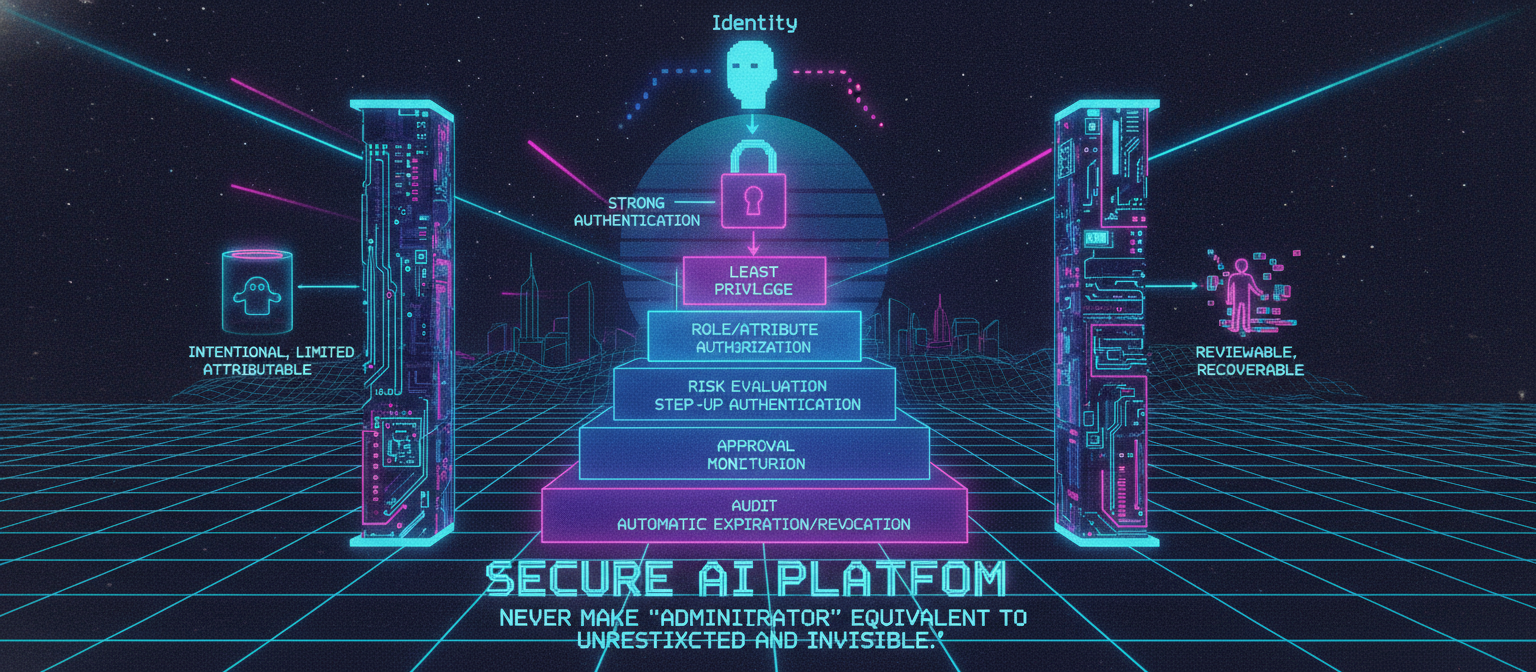
73.61 Final Architecture Principle
Administrative security should follow a layered model:
Identity
   ↓
Strong Authentication
   ↓
Least Privilege
   ↓
Role/Attribute Authorization
   ↓
Risk Evaluation
   ↓
Step-Up Authentication
   ↓
Approval
   ↓
Controlled Execution
   ↓
Audit
   ↓
Monitoring
   ↓
Automatic Expiration/Revocation
The goal is not to make administration impossible.
The goal is to make privileged actions:
intentional, limited, attributable, reviewable, and recoverable.
A secure AI platform should assume that privileged credentials can eventually be targeted. By minimizing privilege, separating duties, using temporary access, protecting administrative APIs, monitoring privileged actions, and requiring stronger controls for high-impact operations, the platform can significantly reduce the blast radius of administrative compromise.
The central principle is:
Never make “administrator” equivalent to “unrestricted and invisible.”
A secure administrator is an authenticated, authorized, scoped, monitored, and accountable actor.