
Chapter 77 — Secure AI Platform High Availability & Reliability Engineering
77.1 Introduction
High availability (HA) and reliability engineering focus on keeping an AI platform dependable under normal traffic, unexpected failures, traffic spikes, and partial infrastructure outages.
Disaster recovery answers:
“How do we recover after a major failure?”
Reliability engineering additionally asks:
“How do we prevent smaller failures from becoming major outages in the first place?”
For an AI platform, reliability must cover:
frontend
API gateway
authentication
databases
object storage
queues
workers
AI providers
model services
RAG
vector databases
memory
notifications
billing
monitoring
security systems
A reliable platform is not necessarily one that never experiences errors.
It is one that detects failures quickly, limits their impact, recovers predictably, and continuously improves.
77.2 Reliability as a System Property
Reliability should be designed across the entire request path.
User
 ↓
Frontend
 ↓
CDN / Traffic Layer
 ↓
API Gateway
 ↓
Authentication
 ↓
Application
 ↓
Database
 ↓
Queue
 ↓
Worker
 ↓
AI Provider
 ↓
Storage
 ↓
Response
A single fragile dependency can reduce the reliability of the entire workflow.
Therefore:
System Reliability
≈
reliability of the complete dependency chain
The exact mathematical relationship depends on architecture, redundancy, and failure independence, but the engineering lesson is straightforward:
A highly reliable application cannot compensate indefinitely for a critical dependency that fails frequently.
77.3 Availability vs Reliability
These concepts are related but different.
Availability
Whether the service is operational when users need it.
Reliability
How consistently the system performs correctly over time.
For example:
Service is reachable
      ↓
Request succeeds
      ↓
Correct result returned
A system that responds quickly but frequently produces incorrect results is not sufficiently reliable.
For AI applications, correctness can include:
valid output
correct tenant
correct authorization
correct model routing
correct billing
correct job state
correct file association
77.4 SLI — Service Level Indicator
An SLI is a measurable indicator of service behavior.
Examples:
API availability
Request latency
Error rate
Successful job completion
Queue delay
Database availability
AI provider success rate
Example:
Successful requests
-------------------
Eligible requests
The precise SLI definition should reflect the actual service objective.
77.5 SLO — Service Level Objective
An SLO defines the desired performance level.
Example:
API availability SLO = 99.9%
Another example:
95% of normal API requests
complete within the defined latency target.
SLOs should be realistic and measurable.
They should not simply be aspirational numbers.
77.6 SLA — Service Level Agreement
An SLA is generally an external or contractual commitment.
The hierarchy can be thought of as:
SLI
 ↓
What we measure

SLO
 ↓
What we aim for

SLA
 ↓
What we formally promise
Internal engineering targets can be stricter than an external SLA.
77.7 Error Budgets
An error budget represents the amount of unreliability permitted by an SLO.
For example, a 99.9% monthly availability target allows approximately:
0.1%
of the measurement period outside the target, subject to the exact SLO definition.
The important principle is:
Reliability is a resource that must be balanced against development speed and feature delivery.
If a service consumes its error budget rapidly, the organization may temporarily prioritize reliability work over new features.
77.8 Choosing Useful SLOs
Avoid measuring everything.
Useful SLOs should reflect user experience.
Examples:
API
successful request rate
latency
AI Generation
successful generation rate
time-to-completion
File Processing
successful processing rate
processing latency
RAG
successful retrieval
retrieval latency
Authentication
successful login
token validation availability
77.9 Health Checks
Health checks allow infrastructure to determine whether a service is functioning.
Common categories:
Liveness
Is the process running?
Process alive?
Readiness
Can the service safely receive traffic?
Ready to serve?
Dependency health
Are required dependencies available?
Database reachable?
Queue reachable?
These checks should be carefully designed.
A service that reports itself healthy while unable to process requests can cause traffic to be routed into a failure.
77.10 Liveness vs Readiness
A process may be alive but not ready.
Example:
Application process
       ↓
running

Database connection
       ↓
unavailable

Result:
alive = yes
ready = no
Traffic should generally not be routed to a service that is alive but unable to perform its required function.
77.11 Dependency-Aware Health Checks
A health endpoint should not necessarily fail because every optional dependency is unavailable.
For example:
Core database → required
Analytics → optional
Recommendation engine → optional
If analytics fails:
Core API
   ↓
still operational
The health model should distinguish critical from optional dependencies.
77.12 Load Balancing
Load balancing distributes traffic across healthy instances.
             Users
                │
                ▼
          Load Balancer
          /     |      \
         ▼      ▼       ▼
      API-1   API-2   API-3
If API-2 fails:
API-1   API-3
  ↑       ↑
  └─ traffic ─┘
Traffic should be directed away from unhealthy instances.
77.13 Stateless Application Design
Stateless application servers are generally easier to scale.
Instead of storing important session state only inside:
API server memory
use durable/shared state where required:
API instances
     │
     ▼
Shared session/state layer
This allows requests to move between instances without losing essential state.
77.14 Horizontal Scaling
Horizontal scaling means adding more instances.
Traffic increases
       ↓
API-1
API-2
API-3
       ↓
Add API-4
       ↓
Add API-5
This can improve:
throughput
availability
fault tolerance
provided the underlying dependencies can also handle the increased load.
77.15 Vertical Scaling
Vertical scaling increases the resources of an instance.
2 CPU / 4 GB RAM
       ↓
4 CPU / 8 GB RAM
Vertical scaling can be useful, but it eventually encounters hardware or cost limits.
A mature platform often combines vertical and horizontal scaling.
77.16 Autoscaling
Autoscaling dynamically adjusts capacity.
Possible signals:
CPU utilization
memory
request rate
queue depth
request latency
active jobs
GPU utilization
For AI workloads, queue depth can be especially meaningful.
Example:
Queue depth increases
        ↓
Worker count increases
        ↓
Processing catches up
Autoscaling should include upper limits to prevent runaway resource consumption.
77.17 AI Worker Autoscaling
AI media processing can be resource intensive.
A worker architecture may look like:
             Queue
               │
       ┌───────┼───────┐
       ▼       ▼       ▼
    Worker   Worker   Worker
       │       │       │
       └───────┼───────┘
               ▼
           AI Service
Worker count can respond to:
queue depth
job age
GPU capacity
CPU capacity
memory pressure
77.18 Capacity Planning
Reliability requires enough capacity before a failure occurs.
Capacity planning should consider:
normal traffic
peak traffic
seasonal traffic
unexpected spikes
growth
failover capacity
background workloads
Example:
Normal capacity = 100 units
Expected peak = 150 units
Failover requirement = 180 units
The platform must determine whether enough infrastructure exists to survive the defined scenario.
77.19 Headroom
Operating at 100% capacity is dangerous.
If:
capacity = 100%
then even a small traffic increase can cause:
latency
queue growth
timeouts
failures
Maintaining controlled headroom provides room for unexpected demand.
77.20 Backpressure
Backpressure prevents overloaded systems from accepting unlimited work.
Example:
User requests
     ↓
Queue
     ↓
Workers overloaded
     ↓
Backpressure
Possible responses include:
queueing
rate limiting
temporary rejection
lower-priority scheduling
degraded processing
The objective is to protect the system from collapse.
77.21 Rate Limiting
Rate limiting controls request volume.
It can operate at multiple levels:
IP
User
Tenant
API key
Endpoint
AI model
Tenant-aware limits are especially important in multi-tenant AI platforms.
Example:
Tenant A → allowed quota
Tenant B → allowed quota
Tenant C → allowed quota
One tenant should not consume all shared resources.
77.22 Fairness and Noisy Neighbors
A noisy neighbor is a tenant or workload that consumes disproportionate shared resources.
Example:
Tenant A → normal usage
Tenant B → enormous generation workload
Tenant C → normal usage
Without controls:
Tenant B
   ↓
consumes shared capacity
   ↓
Tenant A/C performance degrades
Controls include:
quotas
concurrency limits
priority queues
per-tenant rate limits
resource pools
workload isolation
77.23 Queue Priority
Not every job needs equal priority.
Possible categories:
Critical
High
Normal
Low
For example:
security workflow
    ↓
high priority

large video rendering
    ↓
normal priority

analytics rebuild
    ↓
low priority
Priority policies should be predictable and resistant to abuse.
77.24 Timeout Design
Every network operation should have an appropriate timeout.
Without timeouts:
Request
  ↓
dependency hangs
  ↓
worker waits forever
  ↓
resources exhausted
Timeouts prevent indefinite resource consumption.
However, timeouts should be paired with appropriate retries.
77.25 Retry Design
Retries can improve resilience against temporary failures.
But uncontrolled retries can amplify outages.
Example:
Provider failure
      ↓
100 workers retry
      ↓
provider receives 100 more requests
      ↓
failure worsens
This is a retry storm.
Use:
bounded retries
exponential backoff
jitter
idempotency
retry classification
77.26 Retryable vs Non-Retryable Errors
Not every error should be retried.
Potentially retryable:
temporary timeout
temporary network failure
service unavailable
Usually non-retryable:
invalid request
authorization failure
malformed input
policy rejection
Retry decisions should be based on error semantics.
77.27 Circuit Breakers
Circuit breakers prevent repeated calls to a failing dependency.
Conceptually:
Normal
  ↓
requests allowed

Repeated failures
  ↓
Circuit OPEN
  ↓
requests temporarily blocked

Recovery test
  ↓
Circuit HALF-OPEN

Healthy
  ↓
Circuit CLOSED
This prevents cascading failures.
77.28 Bulkheads
Bulkhead architecture isolates workloads.
Example:
Service
 ├── User API pool
 ├── AI generation pool
 ├── File processing pool
 └── Admin pool
If video processing becomes overloaded, it should not automatically consume all resources needed by authentication.
This is the same principle used in ships:
A failure in one compartment should not sink the entire system.
77.29 Cascading Failures
Consider:
AI provider slows
      ↓
Workers wait
      ↓
Queue grows
      ↓
More workers start
      ↓
Database load increases
      ↓
Database slows
      ↓
API latency increases
      ↓
Users retry
      ↓
Traffic increases
This is a cascading failure.
Reliability engineering attempts to break this chain through:
timeouts
circuit breakers
backpressure
bounded concurrency
rate limits
bulkheads
graceful degradation
77.30 Database Reliability
Database reliability requires attention to:
connection pools
query latency
indexes
locks
replication
backups
failover
capacity
migrations
Connection pools should be bounded.
An application that opens unlimited database connections can overwhelm the database during traffic spikes.
77.31 Connection Pool Protection
Conceptually:
1000 incoming requests
        ↓
bounded connection pool
        ↓
controlled database concurrency
Without limits:
1000 requests
 ↓
1000 database connections
 ↓
database exhaustion
77.32 Database Read Scaling
Read-heavy workloads can sometimes use replicas.
Application
    │
    ├── writes → Primary
    │
    └── reads  → Replica
This can reduce pressure on the primary database.
However, replicas may introduce replication lag.
Applications must therefore understand consistency requirements.
77.33 Cache Reliability
Caches can improve performance but should not become the only source of important data unless deliberately designed that way.
A resilient pattern is:
Request
 ↓
Cache
 ├── hit → response
 └── miss
       ↓
    Database
       ↓
    Cache
If the cache disappears, the application should ideally continue operating at reduced performance.
77.34 Cache Stampede
Suppose a popular cache entry expires.
Cache expires
     ↓
1000 requests
     ↓
1000 database queries
This can overload the database.
Mitigations include:
request coalescing
staggered expiration
background refresh
bounded concurrency
77.35 Object Storage Reliability
Object storage workflows should account for:
upload failures
incomplete uploads
network interruptions
duplicate uploads
processing failures
unavailable storage
metadata inconsistency
Upload state can be modeled explicitly:
INITIATED
 ↓
UPLOADING
 ↓
UPLOADED
 ↓
VALIDATING
 ↓
READY
Failed operations should have clear states.
77.36 AI Generation Reliability
An AI generation job might use:
QUEUED
PROCESSING
PROVIDER_PENDING
COMPLETED
FAILED
CANCELLED
This is preferable to a vague:
status = unknown
Durable state allows recovery after worker crashes.
77.37 AI Provider Reliability
Track provider-specific metrics:
success rate
latency
timeout rate
rate-limit rate
error rate
queue delay
The routing layer can use these metrics to determine whether a provider is healthy.
Provider health should not override security policy.
77.38 Model Reliability
Models can fail in ways that infrastructure monitoring cannot detect.
A model endpoint may return HTTP 200 while producing:
malformed output
invalid JSON
incomplete media
unexpected content
incorrect structure
Therefore AI systems require semantic validation.
Example:
Model response
      ↓
Schema validation
      ↓
Content validation
      ↓
Policy validation
      ↓
Accept / reject
77.39 Output Validation
For structured AI output:
Expected:
{
  title: string,
  tags: string[]
}
The application should validate the returned structure rather than blindly trusting the model.
For generated media, validate:
file type
size
integrity
metadata
processing state
77.40 Observability
Reliability requires visibility.
Three major observability signals are:
Logs
Metrics
Traces
They answer different questions.
Logs
What happened?
Metrics
How often is it happening?
Traces
Where did the request spend time or fail?
77.41 Distributed Tracing
A request may pass through:
Frontend
 ↓
Gateway
 ↓
API
 ↓
Database
 ↓
Queue
 ↓
Worker
 ↓
AI Provider
A shared correlation or trace identifier helps connect these events.
Example:
trace_id = T123
The same trace context can make diagnosis significantly easier.
77.42 Alerting
Alerts should focus on actionable conditions.
Useful examples:
API error rate exceeds threshold
Database unavailable
Queue age exceeds threshold
AI provider failure rate increases
Backup verification fails
Tenant authorization errors spike
Avoid alerting on every minor event.
Alert fatigue can cause serious incidents to be ignored.
77.43 Reliability Dashboards
A platform dashboard might show:
Availability
Latency
Error Rate
Queue Depth
Database Health
Storage Health
AI Provider Health
Worker Capacity
Separate dashboards may exist for:
application
infrastructure
AI
security
tenant operations
77.44 Synthetic Monitoring
Synthetic monitoring generates controlled requests to verify that important workflows work.
Example:
Synthetic user
   ↓
Login
   ↓
Create test project
   ↓
Submit test generation
   ↓
Verify output
   ↓
Delete test data
Synthetic tests should use dedicated test identities and data.
They must never interfere with real customer data.
77.45 Reliability Testing
Reliability tests can include:
Load Testing
Can the system handle expected traffic?
Stress Testing
What happens beyond expected capacity?
Soak Testing
Does the system remain stable for extended periods?
Failover Testing
Does the system recover from dependency failure?
Recovery Testing
Can backups actually restore the service?
Chaos Testing
Can controlled failures be contained?
77.46 Capacity Stress Testing
A useful progression:
Normal
  ↓
Peak
  ↓
High load
  ↓
Failure threshold
  ↓
Recovery
The goal is to understand:
where latency rises
where queues grow
where errors begin
what fails first
whether recovery is automatic
77.47 Reliability Under Security Events
Reliability and security overlap.
For example:
Attack traffic
    ↓
API load increases
    ↓
CPU increases
    ↓
Latency increases
Security controls can therefore improve reliability:
rate limiting
bot protection
request validation
quotas
abuse detection
Likewise, reliability controls can improve security by preventing uncontrolled resource exhaustion.
77.48 Reliability and Tenant Fairness
Multi-tenancy requires two simultaneous goals:
Tenant isolation
+
Resource fairness
A tenant should not be able to:
exhaust worker capacity
consume all GPU resources
fill queues indefinitely
monopolize storage processing
overload shared APIs
Per-tenant resource limits provide an important protection layer.
77.49 SLOs for AI Media Platforms
Possible SLO categories include:
API availability
Authentication availability
Upload success rate
Generation success rate
Generation queue latency
RAG availability
Search latency
Notification delivery
Billing correctness
The exact objectives should be based on actual product requirements and user expectations.
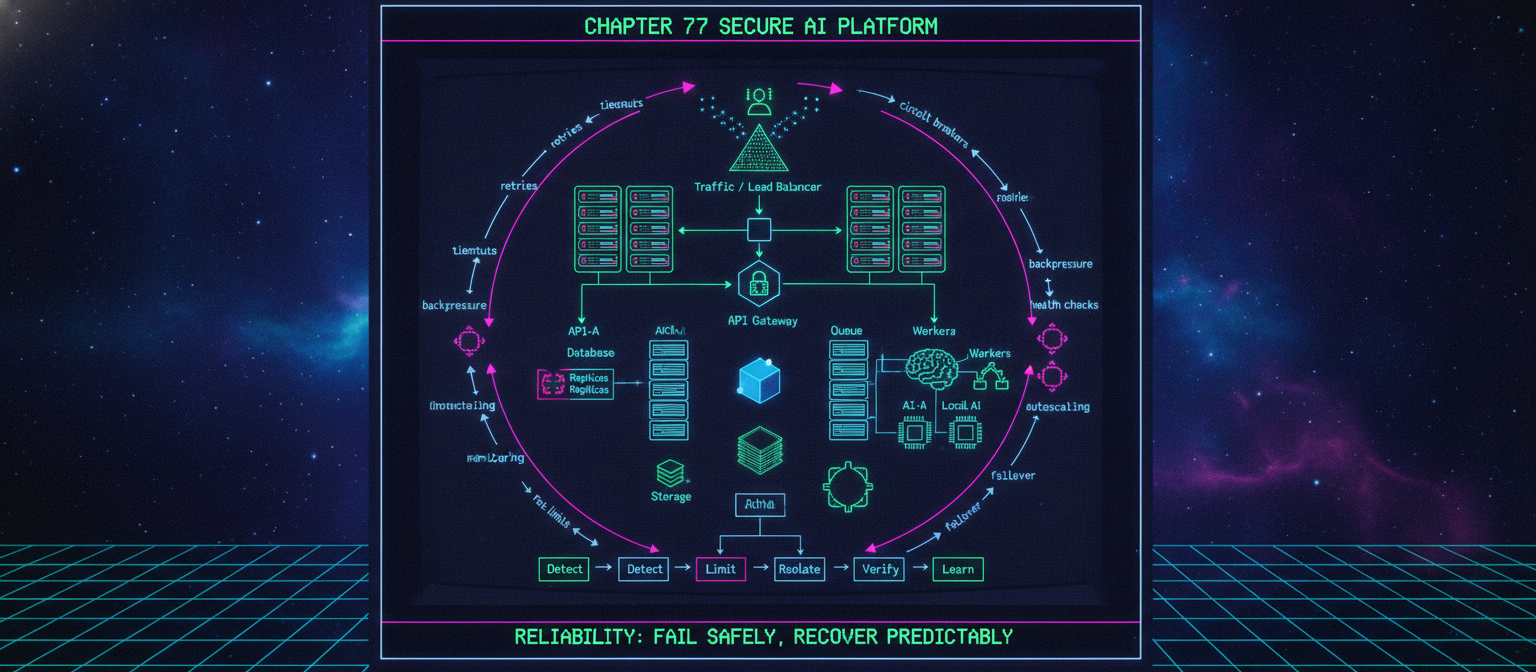
77.50 Reliability Architecture
A mature architecture can be represented as:
                         USERS
                           │
                           ▼
                  Traffic / Load Balancer
                           │
                 ┌─────────┴─────────┐
                 ▼                   ▼
              API-A               API-B
                 │                   │
                 └─────────┬─────────┘
                           ▼
                     API Gateway
                           │
                     Authorization
                           │
            ┌──────────────┼──────────────┐
            ▼              ▼              ▼
         Database       Cache          Queue
            │                             │
            ▼                             ▼
        Replicas                        Workers
                                          │
                              ┌───────────┼───────────┐
                              ▼           ▼           ▼
                           AI-A        AI-B       Local AI
                              │
                              ▼
                           Storage
                              │
                              ▼
                       Observability
Reliability mechanisms surround this architecture:
timeouts
retries
circuit breakers
backpressure
rate limits
health checks
autoscaling
monitoring
failover
77.51 Reliability Checklist
Availability
[ ] Load balancing implemented
[ ] Health checks implemented
[ ] Failed instances removed from traffic
[ ] Critical dependencies have recovery paths
[ ] Appropriate redundancy exists
Performance
[ ] Capacity limits documented
[ ] Connection pools bounded
[ ] Autoscaling configured
[ ] Queue depth monitored
[ ] Backpressure implemented
AI
[ ] Provider health monitored
[ ] Provider failover defined
[ ] Model outputs validated
[ ] AI jobs durable
[ ] Retries bounded
[ ] Idempotency implemented
Multi-Tenant Reliability
[ ] Per-tenant quotas
[ ] Concurrency limits
[ ] Noisy-neighbor protection
[ ] Tenant-aware queue policies
[ ] Resource fairness monitored
Observability
[ ] Metrics
[ ] Logs
[ ] Traces
[ ] Health checks
[ ] Actionable alerts
[ ] Reliability dashboards
Testing
[ ] Load testing
[ ] Stress testing
[ ] Soak testing
[ ] Failover testing
[ ] Restore testing
[ ] Controlled resilience testing
77.52 Final Principle
High availability is not simply:
"run two servers"
Reliability is a system-wide discipline.
A mature AI platform should be able to handle:
traffic spikes
+
dependency failures
+
worker crashes
+
database problems
+
AI provider outages
+
queue overload
+
security events
without allowing one localized problem to become a platform-wide failure.
The core reliability pattern is:
Detect
  ↓
Limit
  ↓
Isolate
  ↓
Recover
  ↓
Verify
  ↓
Learn
The strongest AI platform therefore combines:
SLO-driven engineering + redundancy + graceful degradation + bounded retries + backpressure + observability + capacity planning + controlled failure testing.
Reliability is not the absence of failure.
It is the ability of the system to fail safely, recover predictably, and continue providing trustworthy service.